

1. Introduction
Part of my life was also investigating mobile apps & their APIs, sometimes for security reasons & curiosity, and sometimes to do a few projects that required private APIs that were not publicly available. In this post i’ll be using Instagram as the main example, since it was the app i spent the most time poking at, but the techniques apply to pretty much any mobile app.
While im not super proud of it, and it could as well be considered “illegal” or “Black Hat” practices, it was a great learning experience and a lot of fun to do. I also got a lot of help from the community & some of the greatest engineers in the scene.
I’m not affiliated with Instagram, im not a professional Penetration Tester or anything related to security, im just a hobbyist. The contents of this post are already old and probably not working anymore, still the process is the same for most mobile apps. Please do not try this at home, and do not use this for any illegal purposes. THIS IS FOR EDUCATIONAL PURPOSES ONLY.
2. Glossary & Terminology
- Reverse Engineering - Deconstructing a compiled app to understand its inner workings — reading decompiled code, tracing network calls, and figuring out undocumented behavior.
- Jailbreak - Removing Apple’s security restrictions on iOS devices, giving you root-level access and the ability to run unsigned code and tweaks.
- Root - The Android equivalent of jailbreaking — gaining superuser (root) access to the OS, bypassing manufacturer restrictions.
- JEB - A professional-grade decompiler and debugger for Android APKs. Turns compiled bytecode back into readable Java/Kotlin-like code.
- Frida - A dynamic instrumentation toolkit that lets you inject JavaScript into running apps on both Android and iOS — hook functions, intercept calls, and modify behavior at runtime.
- Certificate Pinning - A security mechanism where an app only trusts specific certificates for its server connections, rejecting even valid CA-signed certs. This makes intercepting API traffic significantly harder.
3. iOS vs Android: Two Very Different Worlds
Rooting or jailbreaking your device can brick it, void your warranty, and compromise your security. You may lose data, break OTA updates, or lock yourself out permanently. Always use a secondary device you’re ok with losing, never your daily driver. Back up everything before you start.
3.1. Root (Android)
Usually when you want to reverse engineer a mobile app, you may want to jailbreak or root the device (in case you want to check the network traffic and get an easy way to explore the app internals at runtime).
For me Android is much easier, since rooting is way more common due to Android being “open source”. Phones like Google Pixel and others are really easy to root with tools like Magisk.
You may also find on XDA forums images for different devices, and how to root them. Keep in mind that rooting will: void your warranty in certain cases like Samsung devices, compromise your security, and you may not be able to use some features of the device. Apps might also detect if you are rooted and block you from using some features or using the app at all (like Pokemon Go), requiring you to have a bunch of workarounds to use the app.
3.2. Jailbreak (iOS)
But thats about Android, iOS is wayyyy more tricky to get root access also known as “jailbreaking”. Back in the days, iPhones were somehow easier to jailbreak, the community was there, we had tools like Cydia, those were the golden days for iOS. But with the years, Apple has been cracking hard on iOS security and also hardware security, demotivating developers from the jailbreaking process, and even some of them being hired by Apple itself to work on the other side. This is one of the reasons why iOS is one of the safest devices that you can use in 2026.
So here for iOS you have a few options in 2026:
- Be on an old iOS version and wait for the community to release a jailbreak for it, but this also means that you will be using a legacy version of the OS and that might cause some red flags to the apps, since 90% of the people usually do update to latest iOS versions.
- VPPhone - A recently released tool that allows you to run virtual iOS devices on your machine, and then you can jailbreak it.
- Corellium - An online iOS emulator that you can use to jailbreak your device & test for security vulnerabilities.
4. The Toolkit: JEB, Frida & Friends
Ok, we got the first part done, assuming you have your device ready to work, now its time to explore a few tools.
For iOS and Android (or anything really) you can use decompilers to explore binary/object code and get a better understanding of the app itself, while apps that care about security will make life harder for you, by having obfuscated code, tampering protection, and the list goes on. You may want to use this to find a few magic strings across the codebase ex: signature_key or whatever you see in the requests (more on that later at section 7).
4.1. JEB & IDA Pro
These are the two heavy hitters when it comes to static analysis, taking an app apart without running it.
JEB is purpose-built for Android. You throw an APK at it and it decompiles the Dalvik bytecode back into readable Java/Kotlin. The UI lets you navigate classes, cross-reference method calls, and rename obfuscated symbols as you figure out what they do. For something like Instagram, you’d open the APK, search for strings like x-ig-signature or signature_key, and then trace backwards through the code to understand how they’re generated. JEB also has a built-in debugger, so you can set breakpoints on a rooted device and step through the code live.
IDA Pro is the industry standard for native code, think C/C++ compiled to ARM. Instagram (and most large apps) ship performance-critical and security-sensitive code as native .so libraries. When you see a Java method calling into libinstagram.so via JNI, that’s where IDA comes in. It disassembles the binary into ARM assembly and tries to reconstruct higher-level structures. It’s harder to read than JEB’s Java output, but it’s where the real secrets hide, crypto routines, signature generation, anti-tampering checks.
In practice you use both together: JEB to get the big picture and find entry points, IDA to dig into the native layers where the interesting logic lives.
Here is a small set of notes on how i used IDA Pro to get the Instagram Signature Key for iOS.
# 1. The iphone must be Jailbroken with Cydia, OpenSSH, and Mobile Substrate
# 2. Download and Install Clutch 2.0 for Cydia on the following repository:
#    http://cydia.iphonecake.com/
# 3. Connect to your Phone via SSH and type Clutch2,
#    it should show the apps installed and their IDs
# 4. Dump the IPA:
Clutch2 -d 1  # (use the ID of your app)
# 5. Check the path where the IPA got extracted,
#    usually at /private/var/mobile/Documents/Dumped/com.xxxxx
# 6. Copy the IPA file to your desktop and rename to .zip to extract it
# 7. Find the file at Payload/AppName.app/AppName (no extension)
#    and drag & drop it into IDA Pro
# 8. Wait for the automatic analysis to finish
# 9. In the functions window, Right Click -> "Quick Filter" -> type "hmac"
# 10. Find NSSString(HMAC)HMACWithSecret
# 11. Find the line of code above CCHmacInit — it should be "sub_xxxx"
# 12. Double click to check the sub function,
#     find the lower16/upper16 and navigate to that string
# 13. Select the main string and go to Edit -> Export Data
# 14. Put the HEX data in a script to decode the signing key:<?php
$encryptedKey = pack("H*", "AABBCCDD..."); // hex data exported from IDA
$hexChars = array(52, 102, 97, 49, 48, 57, 98, 50, 99, 54, 100, 56, 101, 51, 55, 53);
$index = array(244, 216, 173, 177, 178, 179, 184, 187, 159, 102, 106, 115, 124, 89, 13, 59);
$signingKey = "";
$keyMap = array_combine($index, $hexChars);
$encKeyLen = strlen($encryptedKey);
for ($i = 0; $i < $encKeyLen; $i++) {
$signingKey .= pack('C', $keyMap[ord($encryptedKey[$i])]);
}
printf("SigningKey: %s\n", $signingKey);
?>Fun right? Ofc you have to figure out first, what are the actual “sub_xxxx” functions, and so on, i’ll not be covering those in this post.
4.2. Frida
If JEB and IDA are about reading dead code, Frida is about messing with living code. It’s a dynamic instrumentation toolkit, you attach it to a running app and inject JavaScript that can hook any function, intercept arguments, change return values, and basically rewrite the app’s behavior on the fly.
The workflow is simple: you run frida -U -f com.example.app -l your_script.js on a rooted/jailbroken device connected via USB (-U), and Frida spawns the app with your script injected. From there, your script has full access to the app’s memory, symbols, and Objective-C/Java runtime.
In practice, Frida is incredibly versatile, you can use it to extract encryption keys from memory, log function arguments and return values to understand internal logic, dump decrypted payloads, or bypass security checks like certificate pinning and root/jailbreak detection.
Here are two Frida scripts i used back in the day. The first one bypasses certificate pinning at multiple layers so you can intercept the app’s HTTPS traffic with a proxy like Charles or mitmproxy. The second one hooks the HMAC signing process to extract the signing key straight from memory, the dynamic counterpart to the IDA Pro approach from section 4.1.
/**
 * Frida script to bypass SSL/TLS certificate pinning on iOS.
 * Targets multiple layers: custom HTTP framework verification, internal config
 * flags, OpenSSL-based callbacks, and Apple's Security framework.
 *
 * Usage: frida -U -f com.example.app -l ssl-pinning-bypass.js
 */

// ——————————————————————————————————————————————
// 1. Bypass the custom HTTP framework's TLS verification
// ——————————————————————————————————————————————
// Some apps use their own HTTP framework with a custom certificate
// verification step that runs before the standard SSL checks.
// We find it by symbol name and replace it to always succeed.
function bypassCustomTLSVerification() {
  var matches = DebugSymbol.findFunctionsMatching("*validateCertChain*");

  if (matches.length !== 1) {
    console.log("[!] Expected exactly one validateCertChain symbol, found " + matches.length);
    return;
  }

  var original = new NativeFunction(
    matches[0], "int",
    ["uint64", "pointer", "pointer", "pointer", "pointer", "pointer", "pointer"]
  );

  Interceptor.replace(matches[0], new NativeCallback(function (
    _flag, _x509ctx, _str, _failCb, _successCb, _clock, _trace
  ) {
    // Call original but swap the fail callback with the success callback,
    // then force return 1 (success) regardless
    original(_flag, _x509ctx, _str, _successCb, _successCb, _clock, _trace);
    return 1;
  }, "int", ["uint64", "pointer", "pointer", "pointer", "pointer", "pointer", "pointer"]));

  console.log("[+] Custom TLS verification bypassed");
}

bypassCustomTLSVerification();

// ——————————————————————————————————————————————
// 2. Disable internal TLS/SSL config flags
// ——————————————————————————————————————————————
// The app's internal config has several flags that enable enhanced
// TLS features (custom TLS stack, SSL session caching, cert compression).
// We force all of them to return 0 (disabled).

var configFlags = [
  "persistentSSLCacheEnabled",
  "crossDomainSSLCacheEnabled",
  "customTLSEnabled",
  "customTLSPersistentCacheEnabled",
  "quicEarlyDataEnabled",
  "tlsEarlyDataEnabled",
  "enableCertCompression",
];

function disableInternalTLSConfig() {
  var resolver = new ApiResolver("objc");

  for (var i = 0; i < configFlags.length; i++) {
    var flag = configFlags[i];
    var results = resolver.enumerateMatchesSync(
      "-[InternalTLSConfig " + flag + "]"
    );

    if (results.length < 1) {
      console.log("[!] Could not find getter for " + flag);
      continue;
    }

    Interceptor.attach(results[0]["address"], {
      onLeave: function (retval) {
        retval.replace(0);
      },
    });

    console.log("[+] " + flag + " disabled");
  }
}

disableInternalTLSConfig();

// ——————————————————————————————————————————————
// 3. Neutralize OpenSSL certificate callbacks
// ——————————————————————————————————————————————
// The underlying SSL library provides multiple hooks for cert
// verification. We replace them all with no-ops so the app
// never registers its custom pinning callbacks.

function neutralizeSSLCallbacks() {
  var callbackNames = [
    "SSL_CTX_set_cert_verify_callback",
    "SSL_CTX_set_cert_verify_result_callback",
    "SSL_CTX_set_verify",
    "SSL_set_verify",
    "SSL_set_cert_cb",
    "SSL_CTX_set_cert_cb",
    "X509_STORE_CTX_set_verify_cb",
  ];

  for (var i = 0; i < callbackNames.length; i++) {
    var name = callbackNames[i];
    var addresses = DebugSymbol.findFunctionsNamed(name);

    for (var j = 0; j < addresses.length; j++) {
      Interceptor.replace(
        addresses[j],
        new NativeCallback(function () {
          return;
        }, "void", [])
      );
    }

    console.log("[+] " + name + " neutralized (" + addresses.length + " instances)");
  }
}

neutralizeSSLCallbacks();

// ——————————————————————————————————————————————
// 4. Override Apple's SecTrustEvaluate
// ——————————————————————————————————————————————
// Last line of defense — Apple's own Security framework.
// We hook SecTrustEvaluate to always write kSecTrustResultProceed
// to the result pointer and return success (0 = errSecSuccess).

function overrideSecTrustEvaluate() {
  var ptr = Module.findExportByName("Security", "SecTrustEvaluate");

  if (ptr === null) {
    console.log("[!] SecTrustEvaluate not found");
    return;
  }

  var original = new NativeFunction(ptr, "int", ["pointer", "pointer"]);

  Interceptor.replace(ptr, new NativeCallback(function (trust, result) {
    original(trust, result);
    // kSecTrustResultProceed = 1
    Memory.writeU8(result, 1);
    return 0; // errSecSuccess
  }, "int", ["pointer", "pointer"]));

  console.log("[+] SecTrustEvaluate bypassed");
}

overrideSecTrustEvaluate();

console.log("\n[*] All SSL pinning bypasses active. Ready to intercept traffic.\n");
/**
* Hooks the app's HMAC signing method and the underlying SHA256 calls
* to extract the HMAC key material (ipad/opad XOR'd key) from memory.
*
* Usage: frida -U -f com.example.app -l extract-signing-key.js
* Then trigger a request in the app (e.g. try to log in).
*/
var currentThreadId = 0;
var requestBody = "";
var sha256CallCount = 0;
var hasShownSignedBody = false;
var lastDump = "";
function extractSigningKey() {
var resolver = new ApiResolver("objc");
var matches = resolver.enumerateMatchesSync("-[NSString computeHMAC:]");
if (matches.length !== 1) {
console.log("[!] Expected exactly one computeHMAC method, found " + matches.length);
return;
}
Interceptor.attach(matches[0]["address"], {
onEnter: function (args) {
if (currentThreadId === 0) {
currentThreadId = Process.getCurrentThreadId();
requestBody = ObjC.Object(args[0]);
// Now hook the underlying SHA256 update function to capture key material
var moduleResolver = new ApiResolver("module");
var sha256Matches = moduleResolver.enumerateMatchesSync("exports:*!CC_SHA256_Update");
for (var i = 0; i < sha256Matches.length; i++) {
Interceptor.attach(sha256Matches[i]["address"], {
onEnter: function (args) {
if (currentThreadId === Process.getCurrentThreadId()) {
var dump = hexdump(args[1], { length: 0x40, ansi: false, header: false });
if (dump !== lastDump) {
sha256CallCount++;
// HMAC internally does two rounds of hashing:
// 1st call: ipad XOR'd with the key
// 3rd call: opad XOR'd with the key
// From these two values you can recover the original key
if (sha256CallCount === 1) {
console.log("[*] ipad_xor_key =\n" + dump);
}
if (sha256CallCount === 3) {
console.log("[*] opad_xor_key =\n" + dump);
}
lastDump = dump;
}
}
},
});
console.log("[+] CC_SHA256_Update hooked at " + sha256Matches[i]["address"]);
}
}
},
onLeave: function (retval) {
if (Process.getCurrentThreadId() === currentThreadId && !hasShownSignedBody) {
console.log("[*] Signed body example: " + ObjC.Object(retval) + "." + requestBody);
hasShownSignedBody = true;
Interceptor.detachAll();
}
},
});
console.log("[+] HMAC signing method hooked");
console.log("[*] Now trigger a request in the app (e.g. try to log in)...\n");
}
extractSigningKey();The SSL pinning bypass works in 4 layers because apps like these don’t just pin certificates in one place, they stack multiple verification mechanisms on top of each other. If you only bypass one, the others will still reject your proxy’s certificate. You need to get all of them. Once this script is running, you can point the device’s traffic through a proxy and finally see the actual API requests in cleartext.
The key extraction script hooks the HMAC signing function and listens for the underlying CC_SHA256_Update calls. The output gives you the ipad and opad XOR’d keys, the two halves of the HMAC construction. Since HMAC XORs the key with known constants (0x36 for ipad, 0x5c for opad), recovering the original key is trivial, just XOR it back. The static IDA approach from section 4.1 requires you to reverse engineer the key obfuscation in the binary, while this dynamic approach just waits for the app to decrypt the key itself and grabs it from memory.
5. The Cat and Mouse Game
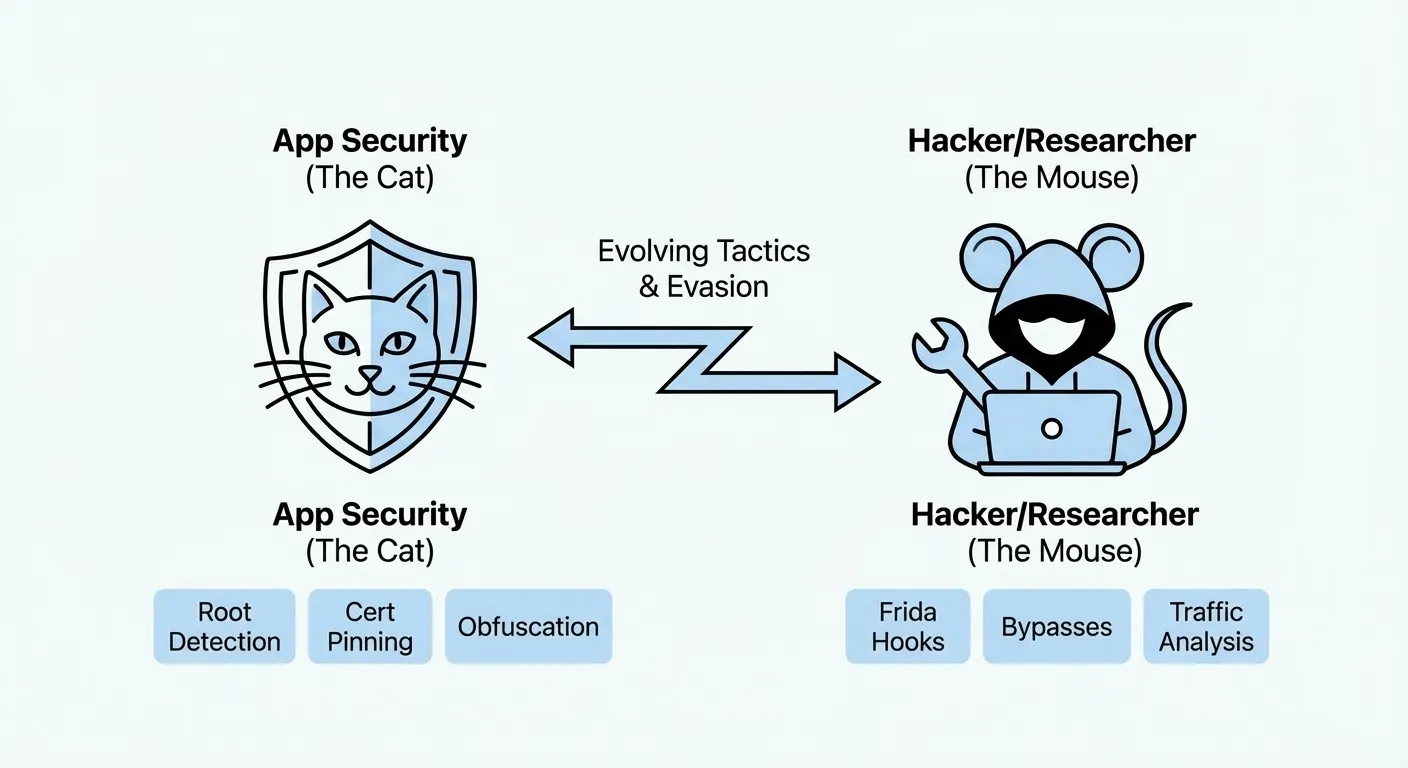
So you rooted your device, installed Frida, and you’re ready to go. You open the app and… it crashes. Or it opens but refuses to load. Or it works but all the requests fail. Welcome to the cat and mouse game.
5.1. Root & Jailbreak Detection
Big apps like Instagram don’t just sit there and let you poke around. They actively check if your device is compromised. On Android, Google’s Play Integrity API (formerly SafetyNet) lets apps verify the device hasn’t been tampered with. On iOS, apps check for common jailbreak artifacts like Cydia, /etc/apt, or the ability to write to system paths.
The thing is, these checks are well known and the community has built workarounds for most of them. On Android, Magisk has Zygisk modules (previously MagiskHide) that hide root from specific apps by running them in an isolated environment where root binaries and modified system files are invisible. On iOS, tweaks like Shadow or A-Bypass patch the detection routines at runtime.
But here’s the catch, apps update their detection methods constantly. You might get it working today and then an app update two weeks later breaks everything again. Its a never-ending cycle.
5.2. Frida Detection
This one is sneaky. Some apps specifically look for Frida itself. They’ll scan for the frida-server process, check if the default Frida port (27042) is open, look for Frida’s agent library in the app’s memory, or even scan for known Frida strings in loaded modules.
There are a few ways around this:
- Rename frida-server to something random, some detection just looks for the process name
- Use Frida Gadget instead of frida-server. Instead of attaching to the app from outside, you embed Frida directly into the app as a library (
.dylibon iOS,.soon Android). This avoids the server entirely and is way harder to detect - Timing your injection, attach after the detection code has already run, or hook the detection functions themselves before they execute (yeah, using Frida to bypass Frida detection, its recursive like that)
- Use frida-stealth or community scripts that patch known detection patterns
In my experience, Frida Gadget was the most reliable approach for heavily protected apps. It takes more setup (you need to repackage the app with the gadget library embedded), but once its in there, the app doesn’t know the difference.
6. Reading the Requests
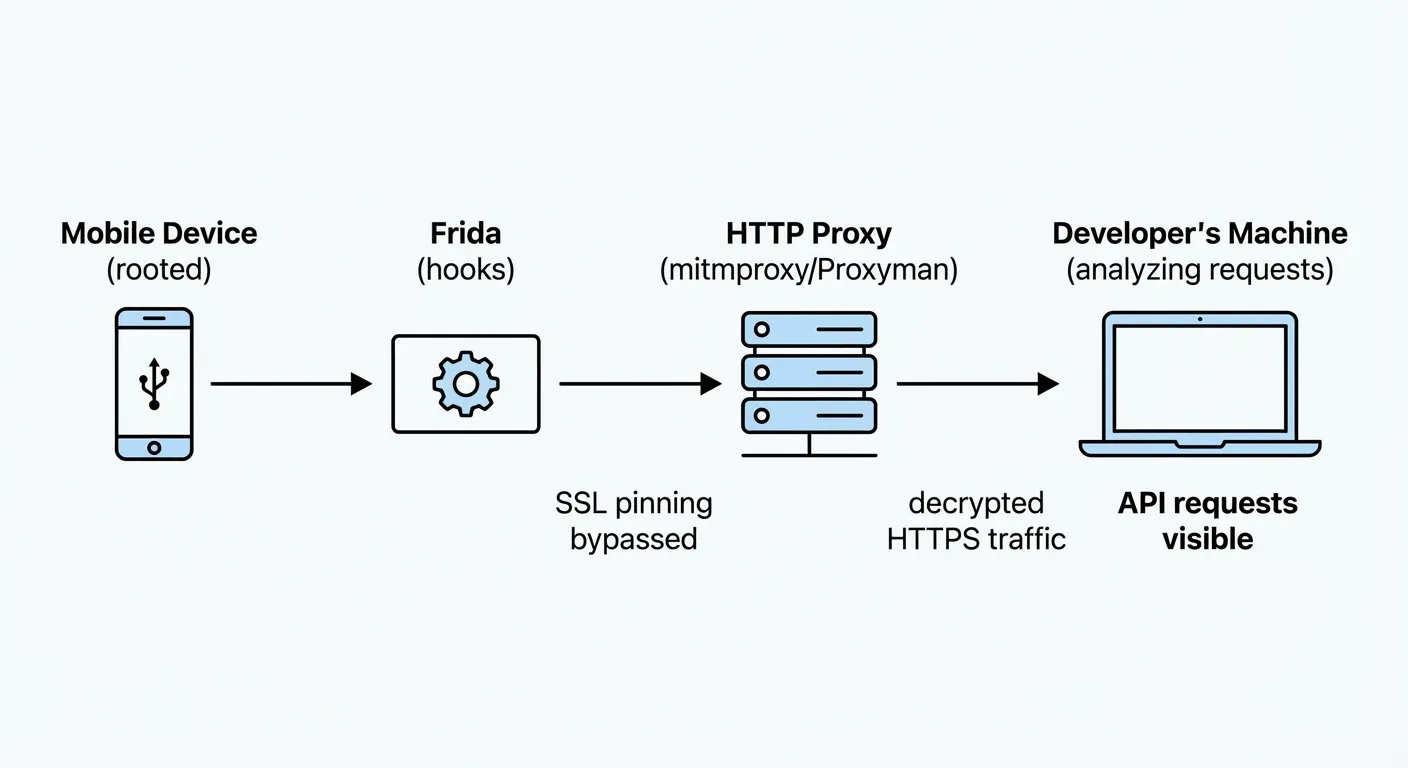
Now that you got everything that you need (or you should by this time) you can continue your journey to explore the app’s HTTP layer. You can use tools like Wireshark, Proxyman, Fiddler, Charles, mitmproxy to capture the network traffic and analyze the data. I usually use mitmproxy when i need flexibility to hook into the request (filter, etc) and Proxyman when i need something really quick to capture. Take the one that fits your needs best.
For apps that don’t have Certificate Pinning, usually the process is as simple as:
- Get the certificate from the proxy app and install it on your mobile device as a trusted certificate.
- Set the WiFi settings to proxy to your proxy server like:
192.168.1.100:8080 - You can try opening Google or any site and it shouldn’t be blocked, if it is, you may have to check the certificate again.
- Open the app and start clicking around and see the requests being logged. Keep in mind that for some apps you will get a TON of requests, most of them about telemetry, analytics, etc.
Once you’re capturing traffic, the trick is knowing what to look for. Most of what you’ll see is noise, telemetry pings, analytics batches, ad SDK calls, config fetches. The interesting stuff is usually the authenticated API calls, look for custom headers like x-ig-signature, x-ig-app-id, or whatever the app uses for request signing. Pay attention to the request body format too, some apps send JSON, others use protobuf or custom binary formats. If the body looks like gibberish, it’s probably signed or encrypted, and thats where the signing key from section 4 comes into play.
A good workflow is to filter by domain first (in Instagram’s case, i.instagram.com), then sort by endpoint to see which APIs are being called. Login flows, feed loading, story viewing, each one hits different endpoints with different payloads. Once you map out the main ones, you start to see the patterns.
7. Data Samples & Privacy Concerns
Well, im betting here that if you do happen to actually get to see some of the mainstream apps like Instagram, Twitter, TikTok etc you will be surprised by the amount of data that is being sent to their servers. Its actually INSANE! This is why most of these apps are locked down and try to make it as hard as possible for the regular user to see this data. Some of the data i saw across multiple apps includes:
- User Location Data (GPS, IP Address, etc)
- Device Hardware Data including: CPU, RAM, Free RAM, Storage, Battery Percentage (YES!)
- SIM Card - Carrier Name, Country, etc
- Time spent on the App, time spent on each photo/video, clicking points, scrolls, etc
- Time spent with the finger over a certain photo, video or post
- If your phone is rooted or not, time since you “booted” the device, also first boot, etc
The list goes on and on, while this data could be used for internal analytics, it can also be used for tracking, fingerprinting & ads. Remember the famous sentence, if its free, you are the product? Yeah, we often forget about it, but when you get to see the actual data, you gonna start thinking twice about it.
Here’s a redacted sample of a single telemetry batch captured from just opening the Instagram app and navigating to the login screen, this is what gets sent before you even type anything. You will get probably 10s of these batches per minute & everytime you wake up your device or make it sleep.
{
"request_info": {},
"batches": [
{
"seq": 0,
"app_id": "000000000000000",
"app_ver": "XXX.0.0.XX.XXX",
"build_num": 0,
"device_id": "aaaaaaaa-bbbb-cccc-dddd-000000000001",
"family_device_id": null,
"session_id": "aaaaaaaa-bbbb-cccc-dddd-000000000002",
"channel": "regular",
"log_type": "client_event",
"app_uid": "0",
"config_version": "v2",
"config_checksum": null,
"data": [
{
"name": "instagram_device_ids",
"time": "1700000001",
"sampling_rate": 1,
"extra": {
"app_device_id": "aaaaaaaa-bbbb-cccc-dddd-000000000001",
"analytics_device_id": null,
"pk": "0",
"release_channel": "prod",
"radio_type": "wifi-none"
}
},
{
"name": "android_apk_testing_exposure",
"time": "1700000002",
"tags": 1,
"extra": {
"build_num": 0,
"installer": "com.google.android.packageinstaller",
"pk": "0",
"release_channel": "prod",
"radio_type": "wifi-none"
}
},
{
"name": "ig_app_background_detection",
"time": "1700000003",
"module": "background_detector",
"tags": 1,
"extra": {
"new_app_state": "foreground",
"detector": "delayed",
"pk": "0",
"release_channel": "prod",
"radio_type": "wifi-none"
}
},
{
"name": "ig_app_background_detection",
"time": "1700000004",
"module": "background_detector",
"tags": 1,
"extra": {
"new_app_state": "postforeground",
"detector": "delayed",
"pk": "0",
"release_channel": "prod",
"radio_type": "wifi-none"
}
},
{
"name": "apk_signature_v2",
"time": "1700000005",
"module": "IgFamilyApplicationInitializer",
"sampling_rate": 1,
"extra": {
"package_name": "com.instagram.android",
"previous_signature": null,
"signature": "V2_SIGN_NOT_FOUND",
"pk": "0",
"release_channel": "prod",
"radio_type": "wifi-none"
}
}
]
},
{
"seq": 0,
"app_id": "000000000000000",
"app_ver": "XXX.0.0.XX.XXX",
"build_num": 0,
"device_id": "aaaaaaaa-bbbb-cccc-dddd-000000000001",
"family_device_id": null,
"session_id": "aaaaaaaa-bbbb-cccc-dddd-000000000003",
"channel": "regular",
"log_type": "client_event",
"app_uid": "0",
"config_version": "v2",
"config_checksum": null,
"data": [
{
"name": "perf",
"time": "1700000006",
"extra": {
"marker_id": 0,
"instance_id": 0,
"sample_rate": 1,
"time_since_boot_ms": 0,
"duration_ms": 2780,
"action_id": 467,
"duration_since_prev_action_ms": 487,
"prev_action_id": 1,
"method": "random_sampling",
"points": [
{
"timeSinceStart": 191,
"name": "RELIABILITY_INITIALIZED"
},
{
"timeSinceStart": 1219,
"name": "SOLOADER_INITIALIZED"
},
{
"timeSinceStart": 1220,
"name": "MULTIDEX_INSTALLED"
},
{
"timeSinceStart": 1620,
"name": "APP_ONCREATE_START"
},
{
"timeSinceStart": 2205,
"name": "APP_ONCREATE_END"
},
{
"timeSinceStart": 2218,
"name": "LAUNCHER_ACTIVITY_ONCREATE_START"
},
{
"timeSinceStart": 2259,
"name": "LAUNCHER_ACTIVITY_ONCREATE_END"
},
{
"timeSinceStart": 2292,
"name": "ACTIVITY_ONCREATE_START"
}
],
"metadata": {
"network_stats": {
"network_type": "wifi",
"network_subtype": "none"
},
"cpu_stats": {
"start_pri": -10,
"stop_pri": -10,
"ps_cpu_ms": 1350,
"th_cpu_ms": 620,
"low_power_state": "not set"
},
"io_stats": {
"ps_flt": 98,
"th_flt": 13,
"class_load_attempts": 0,
"dex_queries": 0,
"class_loads_failed": 0,
"locator_assists": 0,
"wrong_dfa_guesses": 0,
"class_hashmap_generate_successes": 0,
"class_hashmap_generate_failures": 0,
"class_hashmap_load_successes": 0,
"class_hashmap_load_failures": 0,
"ps_min_flt": 14647,
"avail_disk_spc_kb": 18488372
}
},
"annotations": {
"type": "cold",
"failure_reason": "no_surface_attached",
"trigger": "unknown",
"build_type": "prod",
"first_run": "on_install"
},
"annotations_bool": {
"is_successful": false,
"user_logged_in": false
},
"trace_tags": "",
"marker": "client_tti",
"value": 2780,
"pk": "0",
"release_channel": "prod",
"radio_type": "wifi-none"
}
},
{
"name": "android_string_impressions",
"time": "1700000007",
"module": "IgResourcesAnalyticsModule",
"tags": 1,
"extra": {
"impressions": {
"XXXXXXXXXX": 1,
"XXXXXXXXXY": 2,
"XXXXXXXXXZ": 3
},
"string_locale": "en_US",
"pk": "0",
"release_channel": "prod",
"radio_type": "wifi-none"
}
}
]
},
{
"seq": 0,
"app_id": "000000000000000",
"app_ver": "XXX.0.0.XX.XXX",
"build_num": 0,
"device_id": "aaaaaaaa-bbbb-cccc-dddd-000000000001",
"family_device_id": null,
"session_id": "aaaaaaaa-bbbb-cccc-dddd-000000000004",
"channel": "regular",
"log_type": "client_event",
"app_uid": "0",
"config_version": "v2",
"config_checksum": null,
"data": [
{
"name": "step_view_loaded",
"time": "1700000008",
"module": "waterfall_log_in",
"sampling_rate": 1,
"extra": {
"waterfall_id": "aaaaaaaa-bbbb-cccc-dddd-000000000005",
"start_time": 1700000009,
"current_time": 1700000010,
"elapsed_time": 0,
"step": "landing",
"os_version": 26,
"guid": "aaaaaaaa-bbbb-cccc-dddd-000000000001",
"fb_lite_installed": false,
"messenger_installed": false,
"messenger_lite_installed": false,
"whatsapp_installed": false,
"pk": "0",
"release_channel": "prod",
"radio_type": "wifi-none"
}
},
{
"name": "landing_created",
"time": "1700000011",
"module": "waterfall_log_in",
"sampling_rate": 1,
"extra": {
"waterfall_id": "aaaaaaaa-bbbb-cccc-dddd-000000000005",
"start_time": 1700000009,
"current_time": 1700000012,
"elapsed_time": 0,
"os_version": 26,
"fb_family_device_id": null,
"guid": "aaaaaaaa-bbbb-cccc-dddd-000000000001",
"step": "landing",
"funnel_name": "landing",
"did_log_in": false,
"did_facebook_sso": false,
"fb4a_installed": false,
"network_type": "WIFI",
"device_lang": "en_US",
"app_lang": "en_US",
"pk": "0",
"release_channel": "prod",
"radio_type": "wifi-none"
}
},
{
"name": "app_installations",
"time": "1700000013",
"sampling_rate": 1,
"extra": {
"pk": "0",
"release_channel": "prod",
"radio_type": "wifi-none",
"000000000000000": false,
"000000000000001": false,
"000000000000002": true,
"000000000000003": false,
"000000000000004": false,
"000000000000005": false,
"000000000000006": false,
"000000000000007": false,
"000000000000008": false,
"000000000000009": false
}
},
{
"name": "ig_zero_url_rewrite",
"time": "1700000014",
"tags": 1,
"extra": {
"rewritten_url": "https://b.i.instagram.com/api/v1/zr/token/result/?device_id=android-REDACTED&token_hash=&custom_device_id=aaaaaaaa-bbbb-cccc-dddd-000000000001&fetch_reason=token_expired",
"url": "https://i.instagram.com/api/v1/zr/token/result/?device_id=android-REDACTED&token_hash=&custom_device_id=aaaaaaaa-bbbb-cccc-dddd-000000000001&fetch_reason=token_expired",
"pk": "0",
"release_channel": "prod",
"radio_type": "wifi-none"
}
},
{
"name": "ig_zero_url_rewrite",
"time": "1700000014",
"tags": 1,
"extra": {
"rewritten_url": "https://b.i.instagram.com/api/v1/launcher/sync/",
"url": "https://i.instagram.com/api/v1/launcher/sync/",
"pk": "0",
"release_channel": "prod",
"radio_type": "wifi-none"
}
},
{
"name": "ig_zero_url_rewrite",
"time": "1700000015",
"tags": 1,
"extra": {
"rewritten_url": "https://b.i.instagram.com/api/v1/qe/sync/",
"url": "https://i.instagram.com/api/v1/qe/sync/",
"pk": "0",
"release_channel": "prod",
"radio_type": "wifi-none"
}
},
{
"name": "ig_zero_url_rewrite",
"time": "1700000016",
"tags": 1,
"extra": {
"rewritten_url": "https://b.i.instagram.com/api/v1/attribution/log_attribution/",
"url": "https://i.instagram.com/api/v1/attribution/log_attribution/",
"pk": "0",
"release_channel": "prod",
"radio_type": "wifi-none"
}
},
{
"name": "sim_card_state",
"time": "1700000017",
"module": "waterfall_log_in",
"sampling_rate": 1,
"extra": {
"waterfall_id": "aaaaaaaa-bbbb-cccc-dddd-000000000005",
"start_time": 1700000009,
"current_time": 1700000018,
"elapsed_time": 0,
"step": "landing",
"os_version": 26,
"guid": "aaaaaaaa-bbbb-cccc-dddd-000000000001",
"sim_state": "absent",
"has_permission": false,
"pk": "0",
"release_channel": "prod",
"radio_type": "wifi-none"
}
},
{
"name": "ig_zero_url_rewrite",
"time": "1700000019",
"tags": 1,
"extra": {
"rewritten_url": "https://b.i.instagram.com/api/v1/accounts/get_prefill_candidates/",
"url": "https://i.instagram.com/api/v1/accounts/get_prefill_candidates/",
"pk": "0",
"release_channel": "prod",
"radio_type": "wifi-none"
}
},
{
"name": "ig_android_smart_lock_error",
"time": "1700000020",
"module": "waterfall_log_in",
"sampling_rate": 1,
"extra": {
"waterfall_id": "aaaaaaaa-bbbb-cccc-dddd-000000000005",
"start_time": 1700000009,
"current_time": 1700000021,
"elapsed_time": 0,
"os_version": 26,
"fb_family_device_id": null,
"guid": "aaaaaaaa-bbbb-cccc-dddd-000000000001",
"step": "landing",
"has_status": true,
"is_auto_login_enable": false,
"has_resolution": true,
"status_code": 4,
"status_message": "Sign-in required.",
"status_is_cancelled": false,
"status_is_success": false,
"status_is_interrupted": false,
"num_one_tap_accounts": 0,
"action": "handle_ig_credentials_response",
"error": "invalid_status",
"pk": "0",
"release_channel": "prod",
"radio_type": "wifi-none"
}
},
{
"name": "ig_android_googleadid_logged",
"time": "1700000022",
"sampling_rate": 1,
"extra": {
"pk": "0",
"release_channel": "prod",
"radio_type": "wifi-none"
}
},
{
"name": "ig_zero_token_fetch_success",
"time": "1700000023",
"tags": 1,
"extra": {
"carrier_id": 0,
"carrier_name": "",
"pk": "0",
"release_channel": "prod",
"radio_type": "wifi-none"
}
},
{
"name": "switch_to_log_in",
"time": "1700000024",
"module": "waterfall_log_in",
"sampling_rate": 1,
"extra": {
"waterfall_id": "aaaaaaaa-bbbb-cccc-dddd-000000000005",
"start_time": 1700000009,
"current_time": 1700000025,
"elapsed_time": 0,
"step": "landing",
"os_version": 26,
"guid": "aaaaaaaa-bbbb-cccc-dddd-000000000001",
"pk": "0",
"release_channel": "prod",
"radio_type": "wifi-none"
}
},
{
"name": "step_view_loaded",
"time": "1700000026",
"module": "waterfall_log_in",
"sampling_rate": 1,
"extra": {
"waterfall_id": "aaaaaaaa-bbbb-cccc-dddd-000000000005",
"start_time": 1700000009,
"current_time": 1700000027,
"elapsed_time": 0,
"step": "login",
"os_version": 26,
"guid": "aaaaaaaa-bbbb-cccc-dddd-000000000001",
"fb_lite_installed": false,
"messenger_installed": false,
"messenger_lite_installed": false,
"whatsapp_installed": false,
"pk": "0",
"release_channel": "prod",
"radio_type": "wifi-none"
}
},
{
"name": "landing_created",
"time": "1700000028",
"module": "waterfall_log_in",
"sampling_rate": 1,
"extra": {
"waterfall_id": "aaaaaaaa-bbbb-cccc-dddd-000000000005",
"start_time": 1700000009,
"current_time": 1700000029,
"elapsed_time": 0,
"os_version": 26,
"fb_family_device_id": "aaaaaaaa-bbbb-cccc-dddd-000000000006",
"guid": "aaaaaaaa-bbbb-cccc-dddd-000000000001",
"step": "login",
"funnel_name": "login",
"did_log_in": false,
"did_facebook_sso": false,
"fb4a_installed": false,
"network_type": "WIFI",
"device_lang": "en_US",
"app_lang": "en_US",
"pk": "0",
"release_channel": "prod",
"radio_type": "wifi-none"
}
},
{
"name": "send_phone_id_request",
"time": "1700000028",
"module": "waterfall_log_in",
"sampling_rate": 1,
"extra": {
"waterfall_id": "aaaaaaaa-bbbb-cccc-dddd-000000000005",
"start_time": 1700000009,
"current_time": 1700000030,
"elapsed_time": 0,
"os_version": 26,
"fb_family_device_id": "aaaaaaaa-bbbb-cccc-dddd-000000000006",
"guid": "aaaaaaaa-bbbb-cccc-dddd-000000000001",
"prefill_type": "both",
"pk": "0",
"release_channel": "prod",
"radio_type": "wifi-none"
}
},
{
"name": "first_party_token_acquired",
"time": "1700000031",
"module": "waterfall_log_in",
"sampling_rate": 1,
"extra": {
"waterfall_id": "aaaaaaaa-bbbb-cccc-dddd-000000000005",
"start_time": 1700000009,
"current_time": 1700000032,
"elapsed_time": 0,
"step": "login",
"os_version": 26,
"guid": "aaaaaaaa-bbbb-cccc-dddd-000000000001",
"fbid": null,
"pk": "0",
"release_channel": "prod",
"radio_type": "wifi-none"
}
},
{
"name": "get_google_account_attempt",
"time": "1700000033",
"module": "waterfall_log_in",
"sampling_rate": 1,
"extra": {
"waterfall_id": "aaaaaaaa-bbbb-cccc-dddd-000000000005",
"start_time": 1700000009,
"current_time": 1700000034,
"elapsed_time": 0,
"os_version": 26,
"fb_family_device_id": "aaaaaaaa-bbbb-cccc-dddd-000000000006",
"guid": "aaaaaaaa-bbbb-cccc-dddd-000000000001",
"flow": "login",
"api_level": 26,
"pk": "0",
"release_channel": "prod",
"radio_type": "wifi-none"
}
},
{
"name": "get_google_account_failure",
"time": "1700000035",
"module": "waterfall_log_in",
"sampling_rate": 1,
"extra": {
"waterfall_id": "aaaaaaaa-bbbb-cccc-dddd-000000000005",
"start_time": 1700000009,
"current_time": 1700000036,
"elapsed_time": 0,
"os_version": 26,
"fb_family_device_id": "aaaaaaaa-bbbb-cccc-dddd-000000000006",
"guid": "aaaaaaaa-bbbb-cccc-dddd-000000000001",
"flow": "login",
"error_type": "no_permission",
"pk": "0",
"release_channel": "prod",
"radio_type": "wifi-none"
}
},
{
"name": "phoneid_update",
"time": "1700000037",
"sampling_rate": 1,
"extra": {
"custom_uuid": "aaaaaaaa-bbbb-cccc-dddd-000000000001",
"new_id": "aaaaaaaa-bbbb-cccc-dddd-000000000006",
"new_ts": 1700000038,
"type": "initial_create",
"pk": "0",
"release_channel": "prod",
"radio_type": "wifi-none"
}
},
{
"name": "get_google_account_attempt",
"time": "1700000039",
"module": "waterfall_log_in",
"sampling_rate": 1,
"extra": {
"waterfall_id": "aaaaaaaa-bbbb-cccc-dddd-000000000005",
"start_time": 1700000009,
"current_time": 1700000040,
"elapsed_time": 0,
"os_version": 26,
"fb_family_device_id": "aaaaaaaa-bbbb-cccc-dddd-000000000006",
"guid": "aaaaaaaa-bbbb-cccc-dddd-000000000001",
"flow": "login",
"api_level": 26,
"pk": "0",
"release_channel": "prod",
"radio_type": "wifi-none"
}
},
{
"name": "first_party_token_acquired",
"time": "1700000007",
"module": "waterfall_log_in",
"sampling_rate": 1,
"extra": {
"waterfall_id": "aaaaaaaa-bbbb-cccc-dddd-000000000005",
"start_time": 1700000009,
"current_time": 1700000040,
"elapsed_time": 0,
"step": "login",
"os_version": 26,
"guid": "aaaaaaaa-bbbb-cccc-dddd-000000000001",
"fbid": null,
"pk": "0",
"release_channel": "prod",
"radio_type": "wifi-none"
}
},
{
"name": "get_google_account_failure",
"time": "1700000041",
"module": "waterfall_log_in",
"sampling_rate": 1,
"extra": {
"waterfall_id": "aaaaaaaa-bbbb-cccc-dddd-000000000005",
"start_time": 1700000009,
"current_time": 1700000042,
"elapsed_time": 0,
"os_version": 26,
"fb_family_device_id": "aaaaaaaa-bbbb-cccc-dddd-000000000006",
"guid": "aaaaaaaa-bbbb-cccc-dddd-000000000001",
"flow": "login",
"error_type": "no_permission",
"pk": "0",
"release_channel": "prod",
"radio_type": "wifi-none"
}
},
{
"name": "ig_android_smart_lock_error",
"time": "1700000043",
"module": "waterfall_log_in",
"sampling_rate": 1,
"extra": {
"waterfall_id": "aaaaaaaa-bbbb-cccc-dddd-000000000005",
"start_time": 1700000009,
"current_time": 1700000044,
"elapsed_time": 0,
"os_version": 26,
"fb_family_device_id": "aaaaaaaa-bbbb-cccc-dddd-000000000006",
"guid": "aaaaaaaa-bbbb-cccc-dddd-000000000001",
"step": "login",
"has_status": true,
"is_auto_login_enable": false,
"has_resolution": true,
"status_code": 4,
"status_message": "Sign-in required.",
"status_is_cancelled": false,
"status_is_success": false,
"status_is_interrupted": false,
"num_one_tap_accounts": 0,
"action": "handle_ig_credentials_response",
"error": "invalid_status",
"pk": "0",
"release_channel": "prod",
"radio_type": "wifi-none"
}
},
{
"name": "phone_id_response_received",
"time": "1700000045",
"module": "waterfall_log_in",
"sampling_rate": 1,
"extra": {
"waterfall_id": "aaaaaaaa-bbbb-cccc-dddd-000000000005",
"start_time": 1700000009,
"current_time": 1700000046,
"elapsed_time": 0,
"os_version": 26,
"fb_family_device_id": "aaaaaaaa-bbbb-cccc-dddd-000000000006",
"guid": "aaaaaaaa-bbbb-cccc-dddd-000000000001",
"prefill_available": false,
"pk": "0",
"release_channel": "prod",
"radio_type": "wifi-none"
}
}
]
}
]
}8. Conclusion
Reverse engineering mobile apps is one of those things that teaches you more about software than most courses ever will. You learn how apps really work under the hood, how security is (or isn’t) implemented, and just how much data flows between your phone and someone else’s servers without you ever knowing.
I hope this post gave you a decent overview of the process and the tools involved. Whether you’re into security research, building tools that interact with private APIs, or just curious about what your favourite apps are doing behind the scenes, the skills are the same. Root/jailbreak, decompile, hook, intercept, analyze.
Just remember, use this knowledge responsibly. The line between “security research” and “getting yourself in trouble” is thinner than you think. Stay curious, stay ethical, and don’t do anything stupid.
Links
- Magisk - Root your Android device
- VPPhone - Virtual iOS devices
- Corellium - Online iOS emulator
- JEB - Android APK decompiler & debugger
- IDA Pro - Industry standard disassembler for native code
- Frida - Dynamic instrumentation toolkit
- Wireshark - Network protocol analyzer
- Proxyman - macOS HTTP debugging proxy
- Charles - HTTP proxy / monitor
- mitmproxy - Open-source interactive HTTPS proxy
- Fiddler - Web debugging proxy
- XDA Forums - Android development community