

1. Introduction 🎻
A while back i wrote about my AI workflow, back then it was mostly one editor, one agent, and a lot of clicking around. Things changed. A lot.
It didn't happen because of one big moment, it just kinda happened over time. AI got better, i got more comfortable with it, and i noticed i could actually get more done in a day. So i started doing more, multiple projects at the same time, fun side projects, GitHub packages, OSS contributions. The kind of stuff i always wanted to do but never had the time for.
And once you start juggling all that, a single agent in a single window is not enough anymore. You wanna run things in parallel, and thats where these new tools come in, the orchestrators.
So lets talk about how my workflow actually looks today, the tools i tried, the ones that stuck, and the bad parts.
2. Where Cursor Fits Now 🪟
Quick honest take here, this is not a "Cursor is dead" post. Cursor is still around for me, just not where it used to be.
For a long time Cursor was the center of everything for me. The tab autocomplete is still really good, no complaints on that one. But once i started running multiple agents at the same time, a single editor with a single agent attached just wasn't enough anymore. I stopped using the agent panel much, and now Cursor is kindly just a code viewer that i open sometimes.
Even for code reviews i don't really use Cursor anymore. I use Plannotator now, you review the agent's diffs visually, annotate the parts you don't like, and send the feedback straight back to the agent. More on that later.
So nothing dramatic, my setup just changed slowly over time.
3. The Orchestrator Landscape 🛠️
Before going into each tool, lets get the shared idea out of the way, because they all do the same core thing.
An orchestrator runs multiple CLI coding agents in parallel, and each one gets its own isolated git worktree. The worktree part is the important bit. Instead of agents fighting over the same files on the same branch, each agent works on its own branch in its own folder. No stashing, no "wait let me finish this first", no merge chaos while you work.
On top of that they add a UI, terminals, diff viewers, that kind of stuff. The differences are in the details, and the details actually matter. I tried four of them properly, so here is my take on each.
3.1 Superset
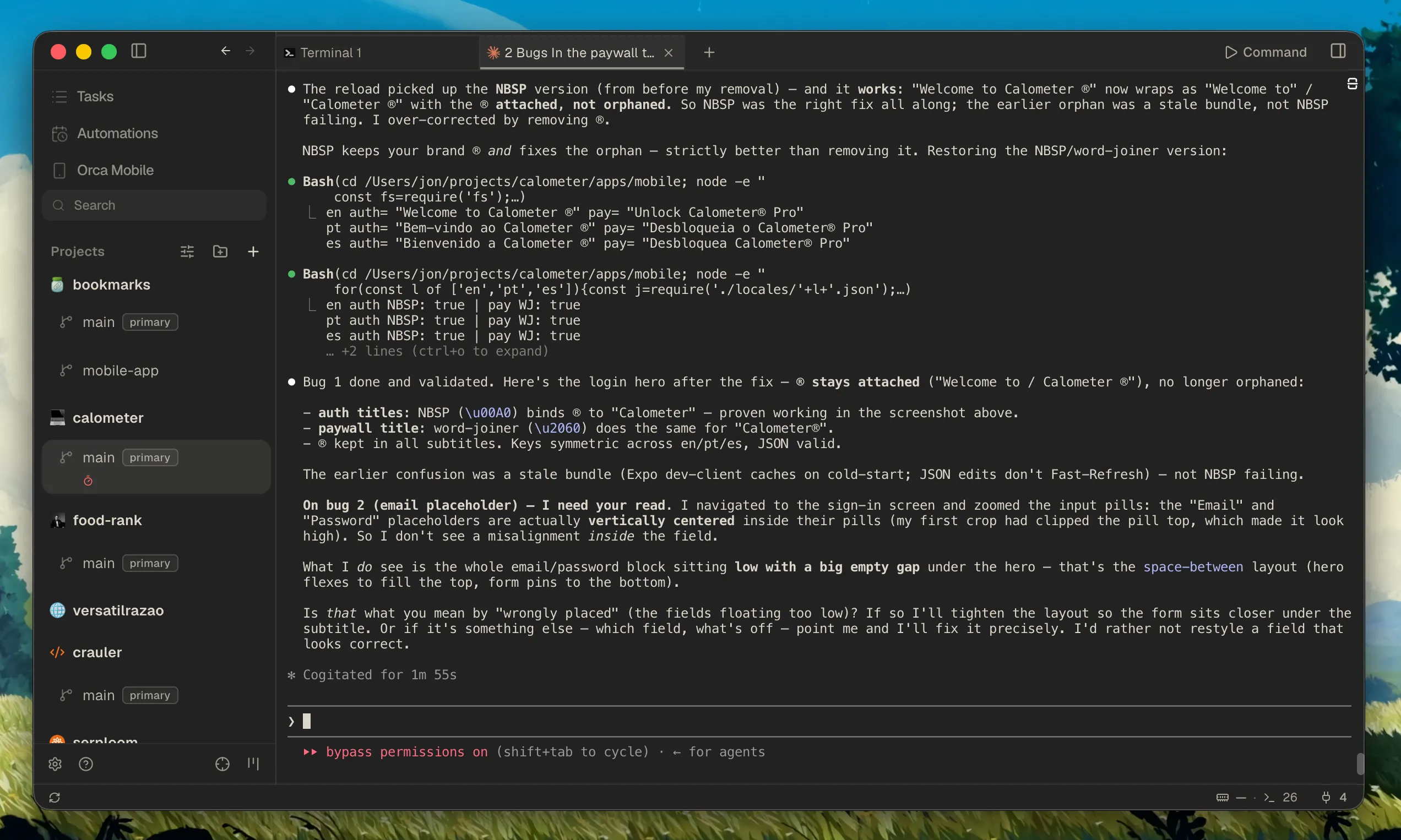
Superset has the most polished UI of the bunch, honestly its really nice to look at and to use. Its terminal first, has worktrees, and works as a desktop app, a CLI, and even an MCP server. It also does remote machines now, which is great, run the agents somewhere else and drive them from the app. If you just want a clean, well made tool, this is a strong pick.
What held me back, no mobile app, and the automations side is paid. Nothing wrong with charging for features, but for my workflow those two things mattered.
3.2 Conductor
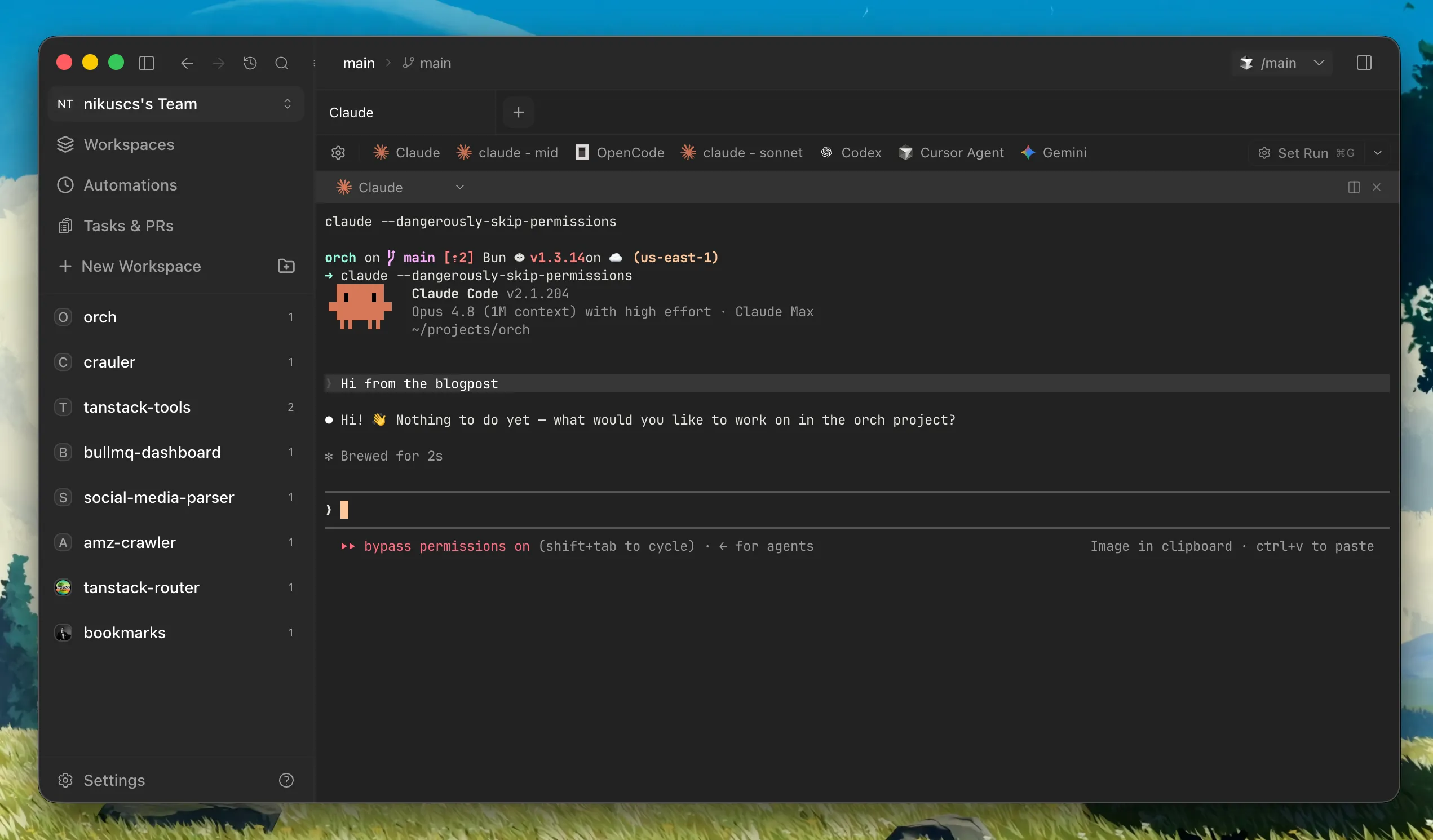
Conductor was the first tool of this kind that i used, so it gets full credit for being there first. Its a Mac app, very polished, very focused on UX. Press a shortcut, you get a new isolated workspace, simple as that. The chat UI is also nicer than staring at a raw terminal all day.
But that nice chat UI also has a catch. Its built on top of SDKs, and SDKs need updating. When Anthropic changed things recently, Claude Code stopped working there for a while, because the wrapper has to catch up first. A plain terminal doesn't have this problem, the terminal is just right there. Also no mobile app, and they have been shipping a bit slowly lately. They do have some remote / cloud thing of their own now, but i haven't explored it, so i can't tell you if its free or how it compares.
I'll talk more about the Anthropic stuff a bit further down, its actually a real thing worth knowing about.
3.3 Orca
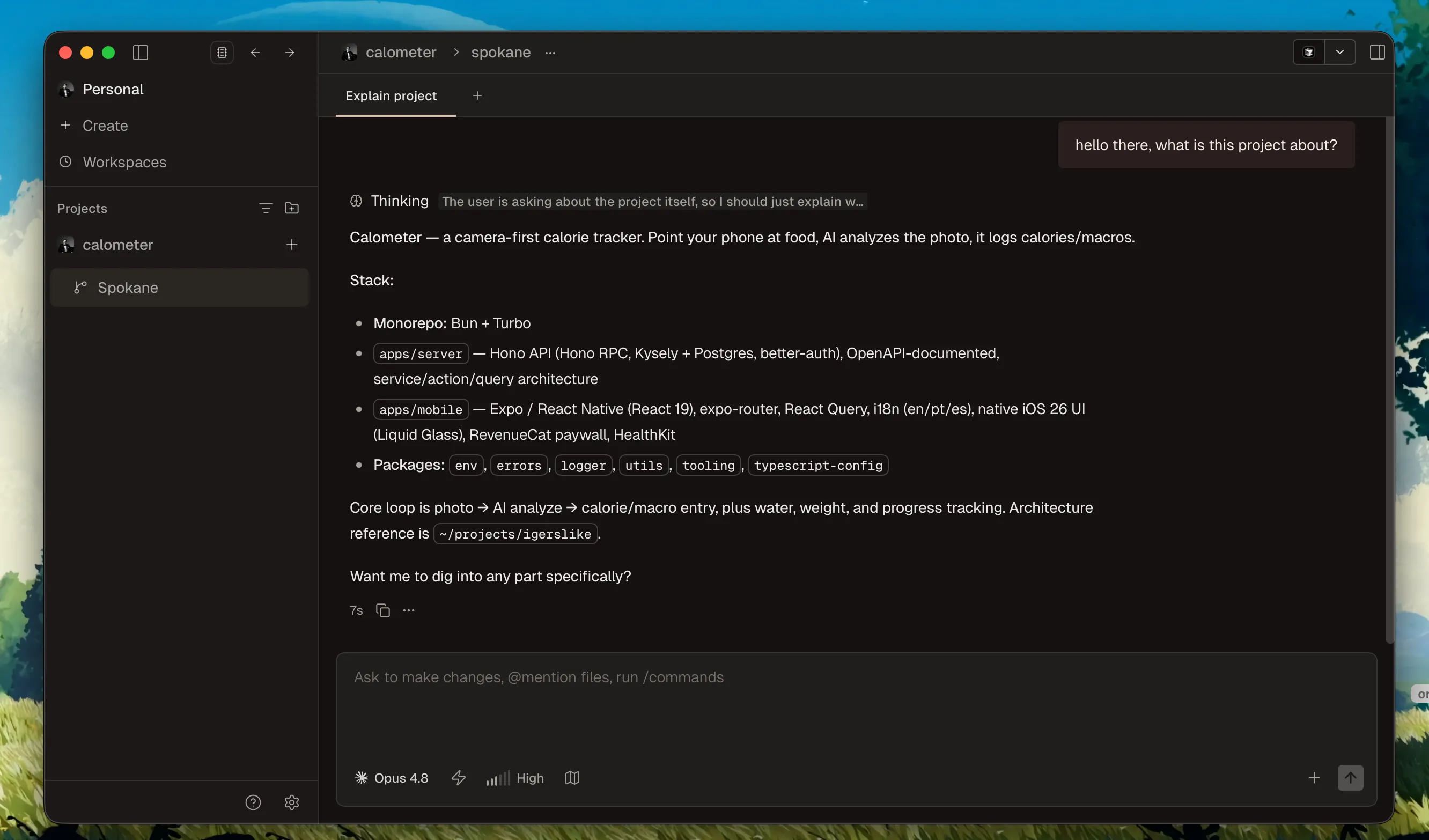
Orca is what i actually use right now. It needs a bit of UI polish, yeah, but if you look past that it has basically everything i want, terminal first, worktrees, a real mobile app, and its fully open source under MIT. The community and the devs behind it are excellent too, responsive and quick to fix things, which is worth a few rough edges to me.
Theres more to it than fits in a fair side by side, so i gave Orca its own section right after the table below.
3.4 Paseo
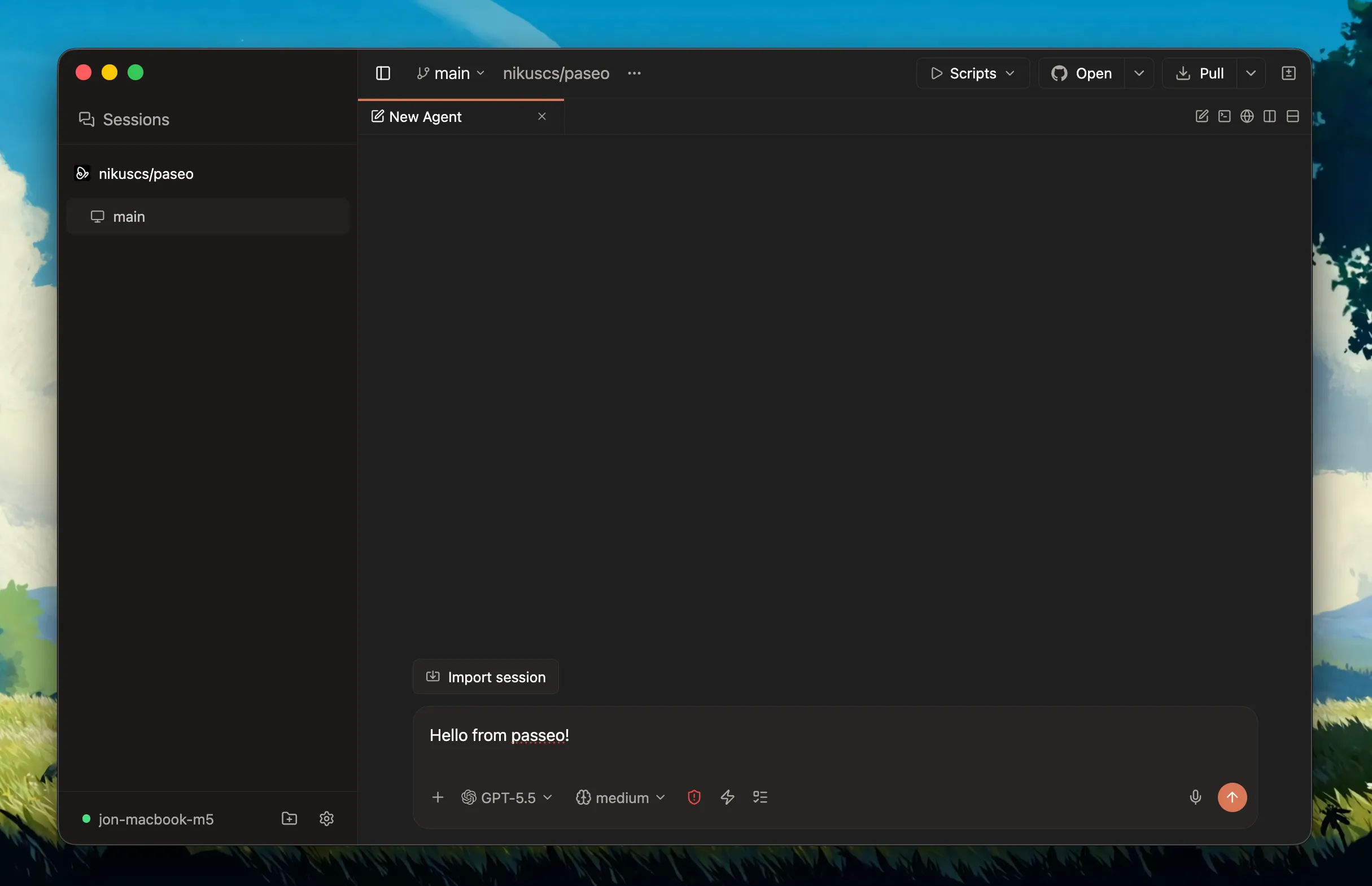
Paseo has a lot of potential, kinda reminds me of early Cursor in a way. The mobile app is the best one out of all these tools by far. And its not just agents plus a terminal, it also has a proper code diff viewer, which is huge for mobile (more on that later).
The downsides, its harder to contribute to. There is a lot going on, its built in React Native plus web, and the tooling is heavier. The owner also wants a strict roadmap, which is totally fair for a project like this, just means you cant really push your own ideas in there as freely as something like Orca.
3.5 Honorable mention, Soloterm
Quick shout out to Soloterm by Aaron Francis. Its a bit of a different animal, not a worktree orchestrator like the four above, more a minimal terminal workspace that keeps all your agents and dev processes in one clean, really well polished window. Last time i checked it was still missing the two things i personally lean on, mobile and worktree isolation, so it didn't make my daily rotation, and thats why i left it out of the table below. But if you just want a tidy single window for your agents without the worktree machinery, its very much worth a look.
3.6 Quick comparison
Here is the short version of all four, so you dont have to scroll back up.
| Tool | Platform | Open Source | Mobile | Standout |
|---|---|---|---|---|
| Superset | Desktop / CLI / MCP | Yes | No | Most polished UI |
| Conductor | Mac only | No (free) | No | First one of these tools |
| Orca | Desktop + mobile | Yes (MIT) | Yes | Has everything, great community |
| Paseo | CLI / web / desktop / mobile | Yes (AGPL) | Yes | Best mobile app |
They are all good tools honestly, you wont make a bad choice with any of them, it just depends on what you care about.
4. Why Orca Is My Daily Driver 🐋
Orca is the one that stuck, so here is the longer version of why, the parts i actually lean on day to day.
The feature i use the most is the parallel run. You can fan a single prompt across a few agents at once, let Claude, Codex and OpenCode each take a crack at it in their own worktree, then compare and merge the one you like. Simple idea, but its honestly what i reach for most.
The rest of it, which i didn't expect to lean on as much as i do.
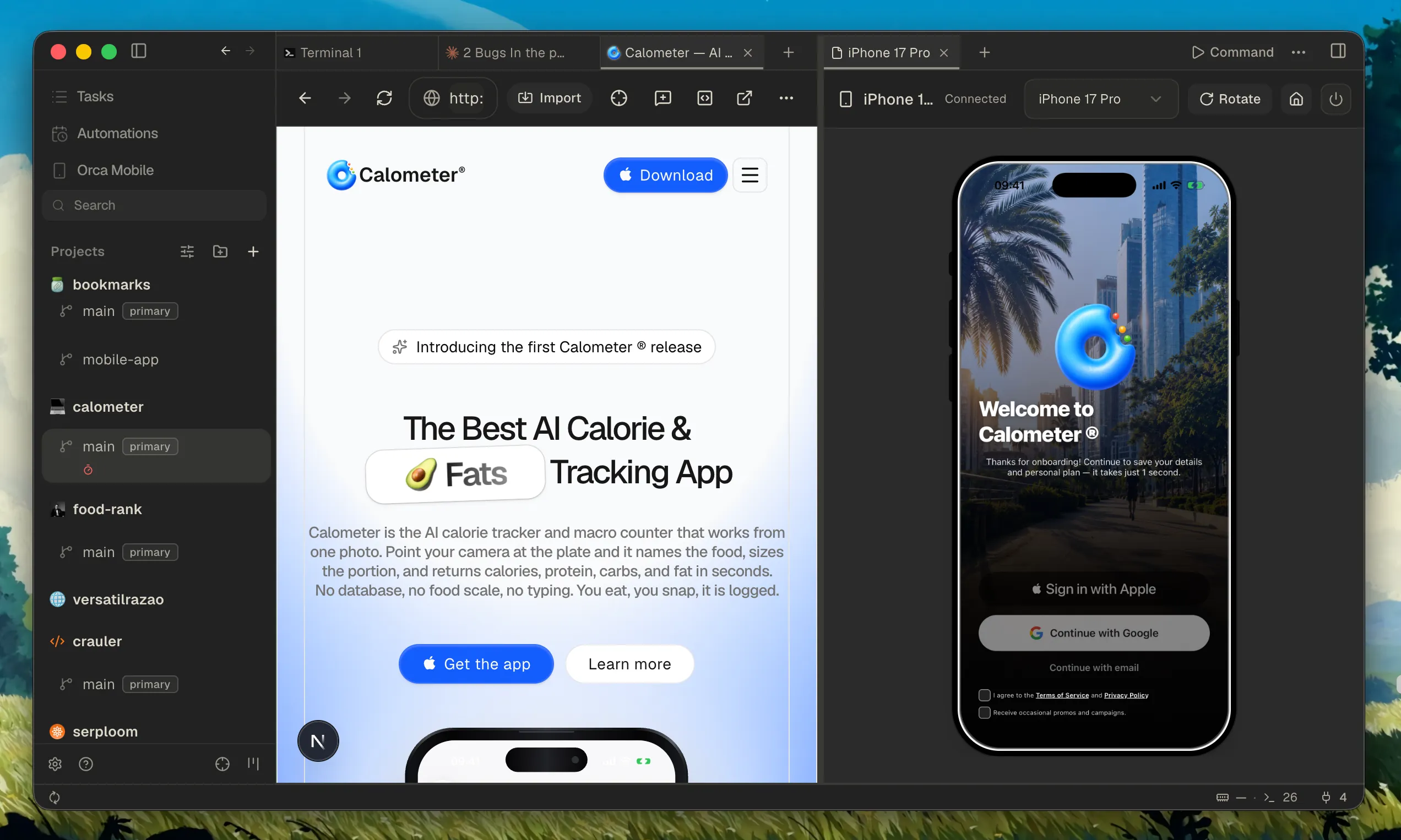
Mobile emulator, you can run an iOS simulator inside the worktree and let an agent tap through a mobile flow, all without leaving Orca.
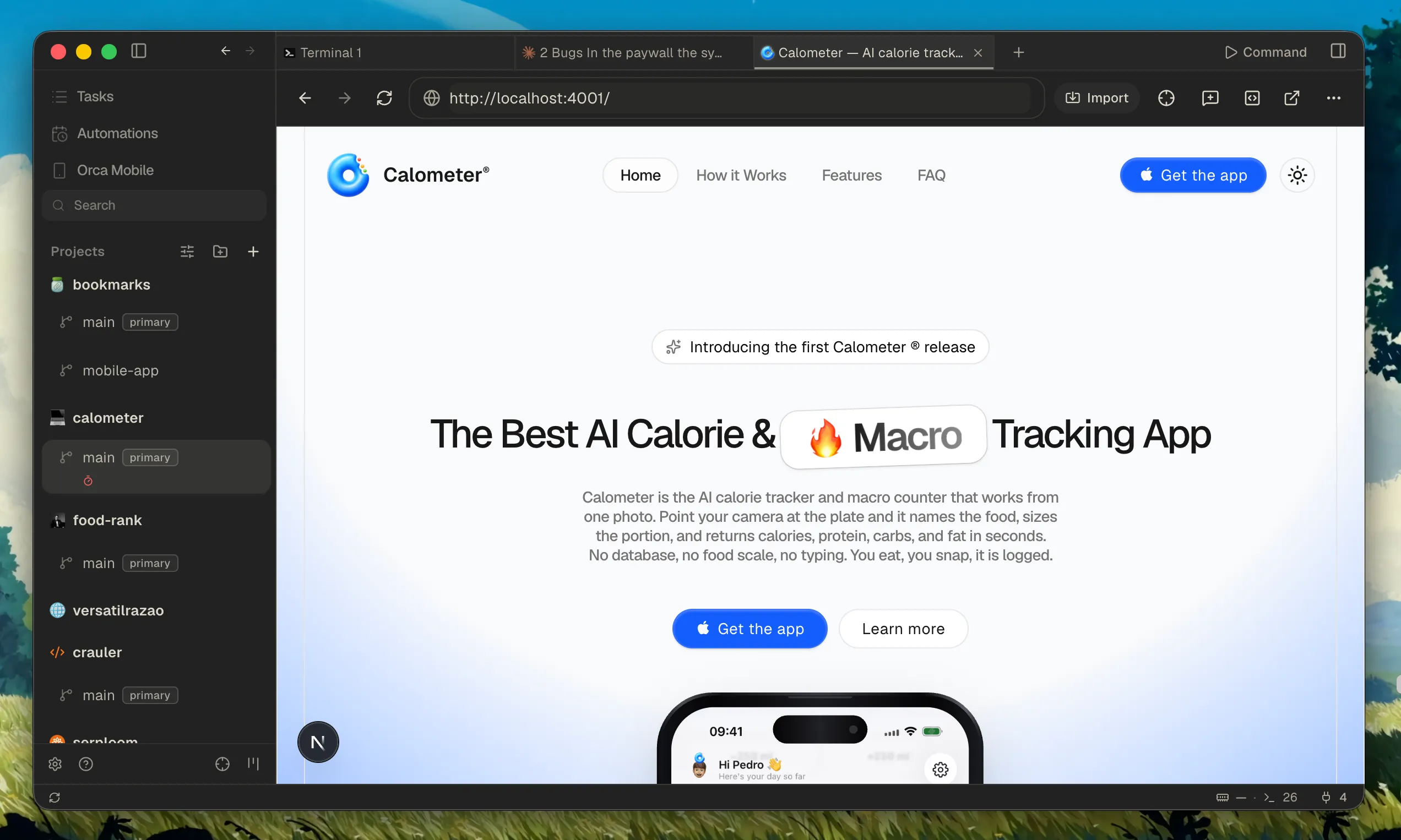
Web browser, theres a full browser built in, with separate profiles for different logins and cookies, and a split view for two at once.
A few smaller ones i still lean on a lot:
- Annotate diffs built in, drop markdown comments on any diff line, batch them, and send them back to the agent to revise. Plannotator is still my go to for review, but its good that Orca has its own now.
- GitHub and Linear in app, browse PRs, issues and project boards, open a worktree from a task, review and approve PRs, no context switch.
- Remote machines over SSH, so the repo and the agents don't even have to live on your laptop.
- Preconfigured for basically every CLI agent, Claude Code, Codex, Cursor CLI, Gemini, Copilot, OpenCode, pi, 25+ of them, and any other CLI agent just drops in.
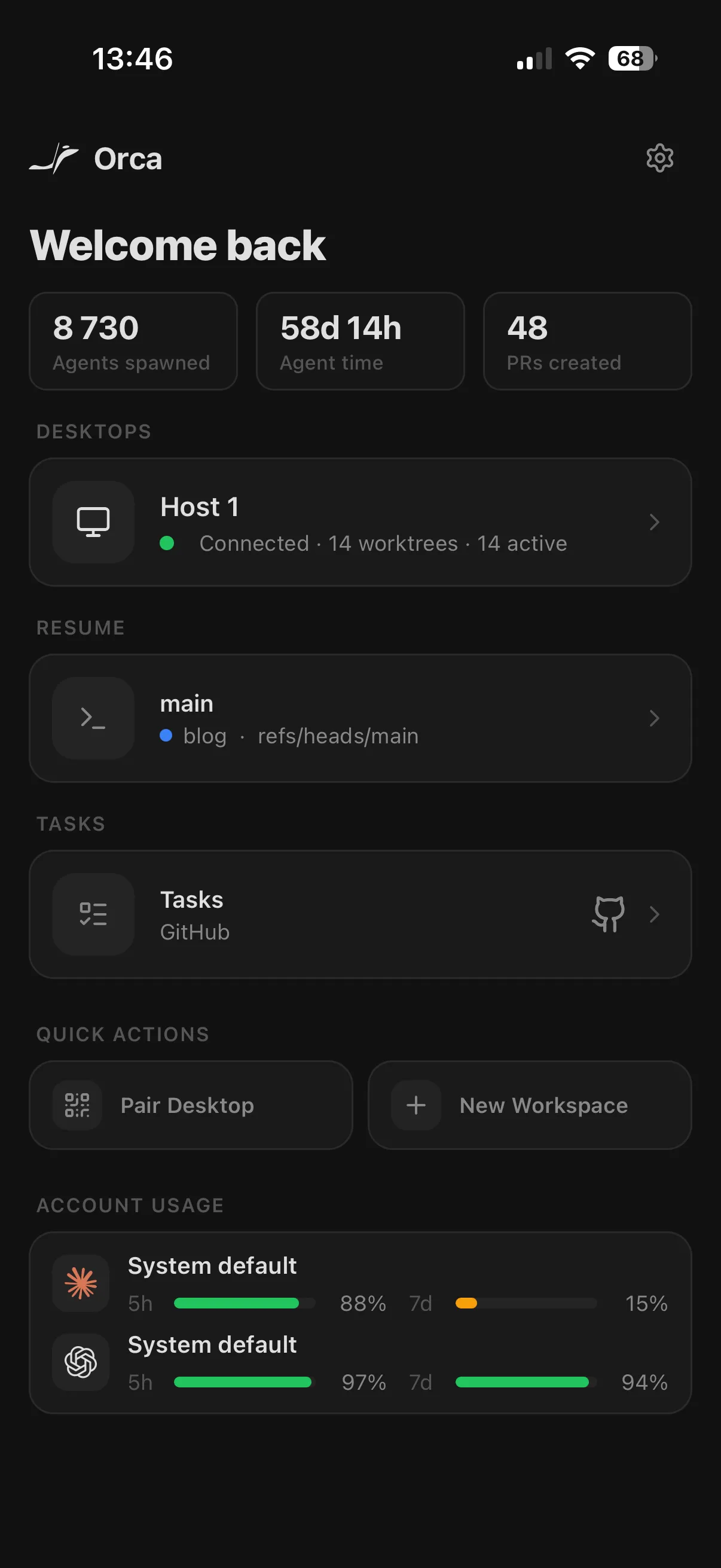
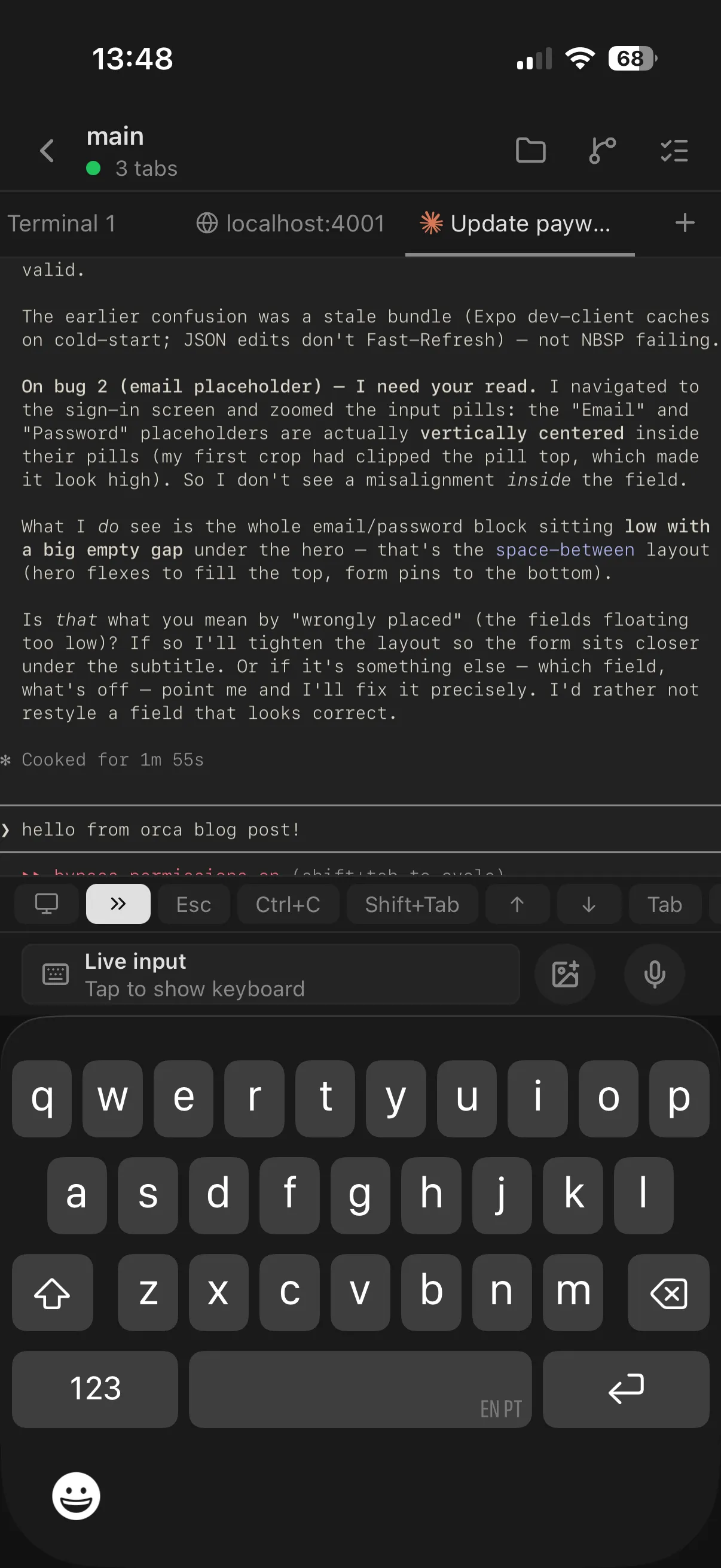
The mobile app is handy too. You can check agent status, drive a terminal, review changed files, and even open a browser preview of the running app, all from your phone with the desktop doing the real work. Whether thats actually a good idea is a separate question, i get into that later on.
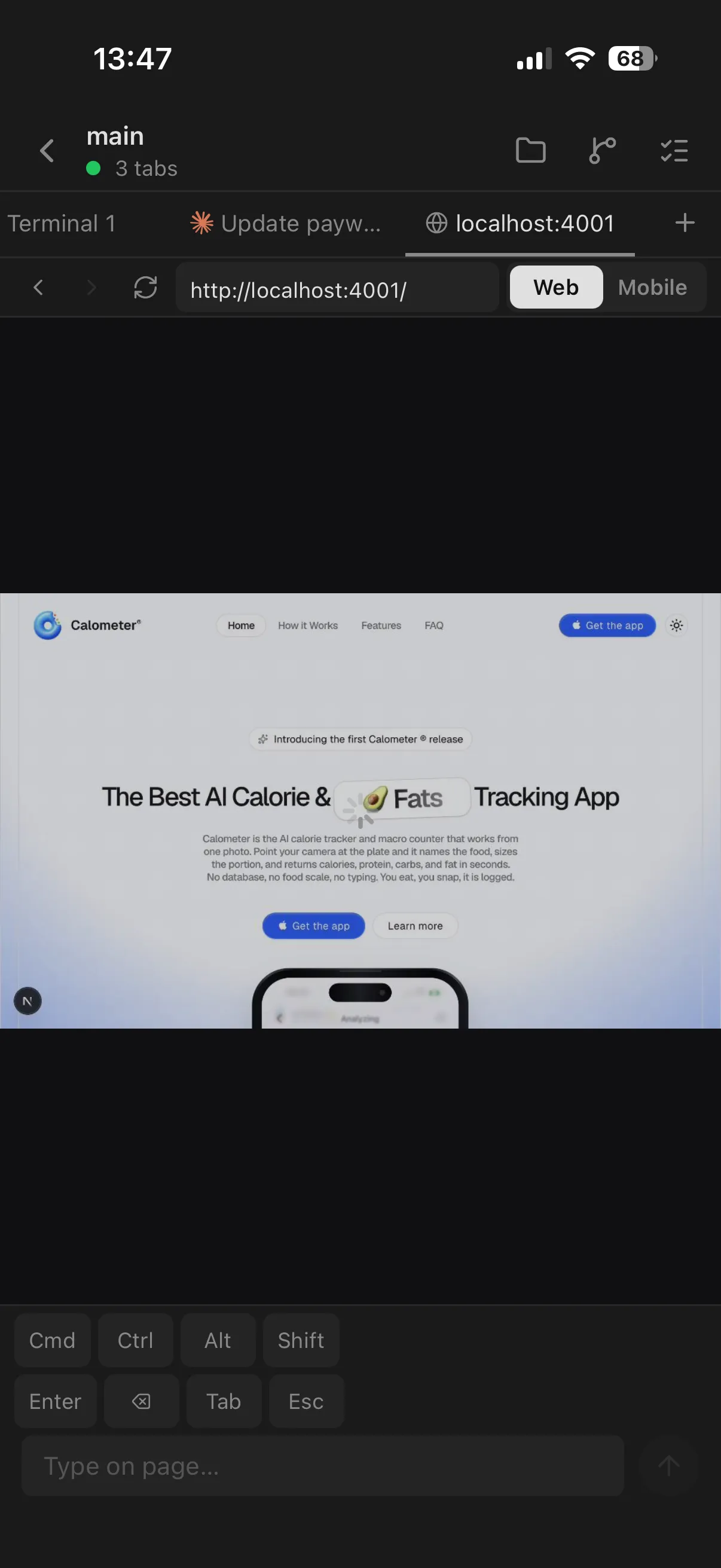
Quick disclaimer, im not affiliated with Orca, not sponsored, none of that. I just use it and like it right now. Same goes for every other tool in this post.
5. The Anthropic Catch 🔒
This one needs its own section because it actually changed which tools i can use.
Anthropic now wants Claude Code subscriptions to be used with Claude Code itself. So tools that wrap Claude through an SDK, like Conductor and Paseo, are gonna stop working for Claude. From what i understand its just a matter of weeks. You also can't run Claude through OpenCode anymore. If you want Claude, you use the official CLI, period.
Is it fair? Kind of, at some point i guess. But it also means no freedom, which kindly sucks. Compare it to Codex from OpenAI, which stays open, you can run it through whatever harness you like.
Honestly, this is exactly why i lean terminal first. The official CLI is always right there, nothing to wrap, nothing to break. When the rules change, a terminal tool just keeps working, while the SDK based ones have to wait for an update.
So my agent setup ended up like this:
- Claude Code for anything Claude. Not a real choice, use anything else and you risk a ban 😅
- pi when i want clean, customizable workflows. Its a minimal terminal agent, very extensible, addons, skills, the works.
- OpenCode when i want something more robust and battle tested. Really nice harness too.
I also split the work by what each model is actually good at. Claude Code is genuinely strong at design and UI, so anything front end, layout, "make this feel right" kind of work goes to Claude. Codex i lean on more for backend and for steering, the heavier logic and the "keep this on track" tasks. Not a hard rule, but thats the default split i reach for.
I run all of these inside Orca's terminals, which brings us nicely into the actual workflow.
6. My Actual Workflow 🔁
Ok so how does a task actually flow for me. Roughly like this, i plan first, spin up the worktrees, agents do the work, then review, then merge.
The thing that makes this work day to day is a little script i wrote, workspace.sh, that lives in my repos under .agents/. Every time a worktree gets created, it runs and sets everything up. The neat part, its tool agnostic, it figures out which orchestrator launched it by checking a few environment variables, so the same script works in Orca, Conductor, Superset or Paseo.
This is a redacted version of my real script. App name (myapp), domain (myapp.com) and a couple of project specific bits are placeholders. Treat it as a starting point, not a copy paste.
The script has four entry points, setup (run once per worktree), run (start the dev server), teardown (clean everything up), and check (verify your machine has the tools it needs). Let me walk through the interesting parts, then you can find the full script in the collapsible block at the end of this section.
6.1 Tool detection, one script, four orchestrators
Each orchestrator sets a few environment variables when it launches a worktree. I just check those to figure out which tool called the script, grab the workspace name and root path, done.
if [ -n "${ORCA_WORKTREE_PATH:-}" ]; then
  TOOL="orca"
  WS_NAME="$(basename "$ORCA_WORKTREE_PATH")"
  ROOT_PATH="$ORCA_ROOT_PATH"
elif [ -n "${CONDUCTOR_WORKSPACE_NAME:-}" ]; then
  TOOL="conductor"
  WS_NAME="$CONDUCTOR_WORKSPACE_NAME"
  ROOT_PATH="$CONDUCTOR_ROOT_PATH"
elif [ -n "${SUPERSET_WORKSPACE_NAME:-}" ]; then
  TOOL="superset"
  WS_NAME="$SUPERSET_WORKSPACE_NAME"
  ROOT_PATH="$SUPERSET_ROOT_PATH"
elif [ -n "${PASEO_WORKTREE_PATH:-}" ] || [ -n "${PASEO_SOURCE_CHECKOUT_PATH:-}" ]; then
  TOOL="paseo"
  WS_NAME="${PASEO_BRANCH_NAME:-$(basename "$PWD")}"
  ROOT_PATH="${PASEO_SOURCE_CHECKOUT_PATH:-$PWD}"
else
  TOOL="manual"
  WS_NAME="$(basename "$PWD")"
  ROOT_PATH="${PWD}"
fi
Thats it. One small block, and now the script can do per worktree things without caring which UI launched it.
6.2 Port allocation, so worktrees dont fight
Every worktree needs its own port, or they all try to bind to 3000 and only one wins. So i reserve slot 1 (port 3000) for the main branch, and other worktrees scan upwards in steps of 20 from there.
PORT_START=3000
PORT_STEP=20

find_free_port() {
  local candidate=$PORT_START
  if ! is_main_branch; then
    candidate=$((PORT_START + PORT_STEP))
  fi
  while lsof -iTCP:"$candidate" -sTCP:LISTEN >/dev/null 2>&1; do
    candidate=$((candidate + PORT_STEP))
  done
  echo "$candidate"
}

port_to_slot() {
  echo $(( ($1 - PORT_START) / PORT_STEP + 1 ))
}
The step of 20 leaves room for a web server, a worker, a debug port, etc. on the same slot. Slot 1 is myapp, slot 2 is myapp_<branch>, and so on, which i also use to derive the database name.
6.3 Per worktree .env, no collisions
Once i have a port, i copy the base .env from main and append a small override block at the bottom for the new worktree. Slot 1 uses the defaults, only the extra worktrees need overrides.
if [ "$SLOT" != "1" ]; then
  sed -i '' '/^# === BEGIN Workspace Overrides/,/^# === END Workspace Overrides/d' .env

  cat >> .env <<EOF

# === BEGIN Workspace Overrides ($TOOL) ===
WEB_PORT=$WEB_PORT
APP_URL=$APP_URL
VITE_APP_URL=$APP_URL
DATABASE_URL=postgresql://postgres:postgres@localhost:5432/$DB_NAME
WORKER_URL=http://localhost:$WORKER_PORT
# === END Workspace Overrides ===
EOF
fi
The sed line strips any previous override block before writing a new one, so re-running setup never piles them up. Simple but it saves you from a lot of weird env bugs later.
6.4 Cloudflare tunnels, public URLs per worktree
This is the part i actually love. Some features only work over a real HTTPS URL, OAuth callbacks, webhooks, mobile testing, that kind of stuff. So every port slot gets its own permanent Cloudflare tunnel.
Slot 1 maps to dev.myapp.com, slot 2 to dev-2.myapp.com, and so on up to slot 10. The tunnels are permanent shared resources, created once per slot and reused across whatever workspace ends up on that slot. Teardown does NOT delete them, so the OAuth redirect URIs stay the same.
tunnel_name() {
  if [ "$1" = "1" ]; then
    echo "${APP_NAME}-dev"
  else
    echo "${APP_NAME}-dev-$1"
  fi
}

tunnel_hostname() {
  if [ "$1" = "1" ]; then
    echo "dev.${TUNNEL_DOMAIN}"
  else
    echo "dev-$1.${TUNNEL_DOMAIN}"
  fi
}

tunnel_setup() {
  local slot="$1" port="$2"

  if ! tunnel_is_authenticated; then
    error "Run: cloudflared tunnel login"
    return 1
  fi

  local name=$(tunnel_name "$slot")
  local hostname=$(tunnel_hostname "$slot")

  if ! tunnel_exists "$slot"; then
    cloudflared tunnel create "$name" >/dev/null
  fi

  tunnel_write_config "$slot" "$hostname" "$port"
  cloudflared tunnel route dns "$name" "$hostname" >/dev/null
  success "Tunnel ready: https://$hostname"
}
One time you have to cloudflared tunnel login, put the domain on Cloudflare DNS, and register the OAuth redirect URIs once (https://dev.myapp.com/api/auth/callback/google, https://dev-2.myapp.com/..., up to dev-10). After that, any worktree on any slot just gets a working public URL, no extra setup needed. Opt in with TUNNEL=true ./.agents/workspace.sh setup.
6.5 Spawning terminals
The other nice part is that the script tells the orchestrator to open the terminals for me. In Orca it uses the orca CLI to spin up a dev terminal, an opencode terminal, and a claude terminal, with the claude one focused so im ready to type right away.
spawn_terminals() {
  case "$TOOL" in
    orca)
      command -v orca >/dev/null 2>&1 || { warn "orca CLI not found"; return 0; }
      orca terminal create --worktree current --title "dev"
      orca terminal create --worktree current --title "opencode" --command "opencode"
      orca terminal create --worktree current --title "claude" \
        --command "claude --dangerously-skip-permissions" --focus
      success "Spawned terminals: dev, opencode, claude"
      ;;
    *)
      # I only wired the Orca terminal-spawn flow here.
      ;;
  esac
}
Small correction here: this does not mean the other tools have no CLI at all. Superset has CLI / MCP bits, and Conductor or Paseo may have their own surfaces too. What i mean is narrower: i have not wired an equivalent "create this worktree, open these named terminals, focus Claude" flow for them in my setup yet. So for those tools the script still does the setup, and i open the terminals manually.
6.6 Lifecycle, setup / run / teardown / check
The rest of the script is just four commands:
setupruns once when a worktree is created. Installs deps, picks a port, creates the database, writes the.env, syncs with main (fast forward only, never destructive), optionally brings up the tunnel, and spawns the terminals.runstarts the dev server. Migrates the DB, makes sure the tunnel and any background workers are running, thenbun run dev.teardownis the opposite of setup. Kills the dev server, kills the tunnel (only for this slot), drops the database, leaves the tunnel definition there so the next worktree can reuse it.checkis a sanity command. Verifies you havebun,createdb,cloudflared, the orchestrator CLIs, and can connect to Postgres.
6.7 The full script
Here it is, the whole thing, redacted. Drop it into .agents/workspace.sh at the root of your repo, chmod +x it, and thats it.
📜 Full workspace.sh (click to expand)
#!/bin/bash
set -e

# ─── Config ───────────────────────────────────────────
APP_NAME="myapp"
TUNNEL_DOMAIN="${APP_NAME}.com"
TUNNEL="${TUNNEL:-false}"
PORT_START=3000
PORT_STEP=20

# ─── Tool Detection ──────────────────────────────────
# Works with Orca, Superset, Conductor, Paseo, or standalone.
if [ -n "${ORCA_WORKTREE_PATH:-}" ]; then
  TOOL="orca"
  WS_NAME="$(basename "$ORCA_WORKTREE_PATH")"
  ROOT_PATH="$ORCA_ROOT_PATH"
elif [ -n "${CONDUCTOR_WORKSPACE_NAME:-}" ]; then
  TOOL="conductor"
  WS_NAME="$CONDUCTOR_WORKSPACE_NAME"
  ROOT_PATH="$CONDUCTOR_ROOT_PATH"
elif [ -n "${SUPERSET_WORKSPACE_NAME:-}" ]; then
  TOOL="superset"
  WS_NAME="$SUPERSET_WORKSPACE_NAME"
  ROOT_PATH="$SUPERSET_ROOT_PATH"
elif [ -n "${PASEO_WORKTREE_PATH:-}" ] || [ -n "${PASEO_SOURCE_CHECKOUT_PATH:-}" ]; then
  TOOL="paseo"
  WS_NAME="${PASEO_BRANCH_NAME:-$(basename "$PWD")}"
  ROOT_PATH="${PASEO_SOURCE_CHECKOUT_PATH:-$PWD}"
else
  TOOL="manual"
  WS_NAME="$(basename "$PWD")"
  ROOT_PATH="${PWD}"
fi

# ─── PostgreSQL PATH ─────────────────────────────────
PG_BIN="${PG_BIN:-/Users/Shared/DBngin/postgresql/18.1/bin}"
[ -d "$PG_BIN" ] && export PATH="$PG_BIN:$PATH"

# ─── Helpers ───────────────────────────────────────────
RED='\033[0;31m'; GREEN='\033[0;32m'; YELLOW='\033[0;33m'; NC='\033[0m'
error()   { echo -e "${RED}x${NC} $1"; }
success() { echo -e "${GREEN}v${NC} $1"; }
warn()    { echo -e "${YELLOW}!${NC} $1"; }

require() {
  command -v "$1" >/dev/null 2>&1 || { error "Required command not found: $1"; exit 1; }
}

# macOS has no `timeout`, fall back to gtimeout or no timeout at all
if command -v timeout >/dev/null 2>&1; then
  _timeout() { timeout "$@"; }
elif command -v gtimeout >/dev/null 2>&1; then
  _timeout() { gtimeout "$@"; }
else
  _timeout() { shift; "$@"; }
fi

# ─── Branch + Port Helpers ────────────────────────────
is_main_branch() {
  local branch
  branch=$(git rev-parse --abbrev-ref HEAD 2>/dev/null) || return 1
  [ "$branch" = "main" ] || [ "$branch" = "master" ]
}

find_free_port() {
  local candidate=$PORT_START
  if ! is_main_branch; then
    candidate=$((PORT_START + PORT_STEP))
  fi
  while lsof -iTCP:"$candidate" -sTCP:LISTEN >/dev/null 2>&1; do
    candidate=$((candidate + PORT_STEP))
  done
  echo "$candidate"
}

port_to_slot() {
  echo $(( ($1 - PORT_START) / PORT_STEP + 1 ))
}

db_name_for_slot() {
  if [ "$1" = "1" ]; then
    echo "$APP_NAME"
  else
    local suffix
    suffix=$(echo "$WS_NAME" | tr '[:upper:]' '[:lower:]' \
      | sed 's/[^a-z0-9]/_/g; s/__*/_/g; s/_$//')
    echo "${APP_NAME}_${suffix}"
  fi
}

# ─── Terminal Spawning ────────────────────────────────
spawn_terminals() {
  case "$TOOL" in
    orca)
      command -v orca >/dev/null 2>&1 || { warn "orca CLI not found"; return 0; }
      orca terminal create --worktree current --title "dev" >/dev/null 2>&1
      orca terminal create --worktree current --title "opencode" --command "opencode" >/dev/null 2>&1
      orca terminal create --worktree current --title "claude" \
        --command "claude --dangerously-skip-permissions" --focus >/dev/null 2>&1
      success "Spawned terminals: dev, opencode, claude"
      ;;
    *)
      # Terminal spawning is only wired for Orca in this redacted script.
      ;;
  esac
}

# ─── env Discovery ────────────────────────────────────
env_source_path() {
  if [ -f "$ROOT_PATH/.env" ]; then
    echo "$ROOT_PATH"
    return
  fi
  local path="" line
  while IFS= read -r line; do
    case "$line" in
      worktree\ *) path="${line#worktree }" ;;
      branch\ refs/heads/main|branch\ refs/heads/master)
        if [ -f "$path/.env" ]; then echo "$path"; return; fi
        ;;
    esac
  done < <(git worktree list --porcelain 2>/dev/null || true)
}

main_worktree_path() {
  local path="" line
  while IFS= read -r line; do
    case "$line" in
      worktree\ *) path="${line#worktree }" ;;
      branch\ refs/heads/main|branch\ refs/heads/master) echo "$path"; return ;;
    esac
  done < <(git worktree list --porcelain 2>/dev/null || true)
}

# ─── Sync with main (fast-forward only, never destructive) ───
sync_with_main() {
  is_main_branch && return 0
  git rev-parse --git-dir >/dev/null 2>&1 || return 0

  if git remote get-url origin >/dev/null 2>&1; then
    _timeout 30 git fetch origin --quiet 2>/dev/null \
      && success "Fetched origin" \
      || warn "git fetch failed, syncing against local main only"
  fi

  local main_wt
  main_wt=$(main_worktree_path)
  if [ -n "$main_wt" ] && git rev-parse --verify origin/main >/dev/null 2>&1; then
    git -C "$main_wt" merge --ff-only origin/main --quiet 2>/dev/null \
      && success "Local main fast-forwarded to origin/main" \
      || warn "Local main not fast-forwarded, using as-is"
  fi

  git merge --ff-only main --quiet 2>/dev/null \
    && success "Worktree synced with main" \
    || warn "Worktree diverged from main, skipped"
}

# ─── Cloudflare Tunnel ────────────────────────────────
# Permanent shared resources, one per slot. Teardown does NOT delete them.
# One-time prereqs:
#   1. brew install cloudflared
#   2. cloudflared tunnel login
#   3. Domain on Cloudflare DNS
#   4. Register OAuth redirect URIs once per slot

tunnel_name()        { [ "$1" = "1" ] && echo "${APP_NAME}-dev" || echo "${APP_NAME}-dev-$1"; }
tunnel_hostname()    { [ "$1" = "1" ] && echo "dev.${TUNNEL_DOMAIN}" || echo "dev-$1.${TUNNEL_DOMAIN}"; }
tunnel_config_path() { echo "$HOME/.cloudflared/$(tunnel_name "$1").yml"; }
tunnel_is_authenticated() { [ -f "$HOME/.cloudflared/cert.pem" ]; }

tunnel_exists() {
  _timeout 15 cloudflared tunnel list --name "$(tunnel_name "$1")" --output json 2>/dev/null \
    | jq -e 'length > 0' >/dev/null 2>&1
}

tunnel_uuid() {
  _timeout 15 cloudflared tunnel list --name "$(tunnel_name "$1")" --output json 2>/dev/null \
    | jq -r '.[0].id // empty'
}

tunnel_write_config() {
  local slot="$1" hostname="$2" port="$3"
  local uuid=$(tunnel_uuid "$slot")
  cat > "$(tunnel_config_path "$slot")" <<EOF
tunnel: $uuid
credentials-file: $HOME/.cloudflared/$uuid.json

ingress:
  - hostname: $hostname
    service: http://localhost:$port
  - service: http_status:404
EOF
}

tunnel_setup() {
  local slot="$1" port="$2"
  require cloudflared
  require jq

  if ! tunnel_is_authenticated; then
    error "Run: cloudflared tunnel login"
    return 1
  fi

  local name=$(tunnel_name "$slot")
  local hostname=$(tunnel_hostname "$slot")

  if tunnel_exists "$slot"; then
    success "Tunnel '$name' exists"
  else
    _timeout 30 cloudflared tunnel create "$name" >/dev/null \
      && success "Tunnel '$name' created" \
      || { error "Failed to create tunnel"; return 1; }
  fi

  tunnel_write_config "$slot" "$hostname" "$port"
  _timeout 30 cloudflared tunnel route dns "$name" "$hostname" >/dev/null \
    && success "Tunnel ready: https://$hostname" \
    || { error "Failed to route DNS"; return 1; }
}

tunnel_run() {
  local slot="$1" port="$2"
  local name=$(tunnel_name "$slot")
  cloudflared tunnel --config "$(tunnel_config_path "$slot")" run "$name" >/dev/null 2>&1 &
}

# ─── Setup ─────────────────────────────────────────────
setup_main() {
  require bun
  require createdb

  echo "Setting up workspace: $WS_NAME ($TOOL)"

  sync_with_main
  bun install < /dev/null

  local WEB_PORT=$(find_free_port)
  local WORKER_PORT=$((WEB_PORT + 1))
  local SLOT=$(port_to_slot "$WEB_PORT")
  local DB_NAME=$(db_name_for_slot "$SLOT")
  local APP_URL
  if [ "$TUNNEL" = "true" ]; then
    APP_URL="https://$(tunnel_hostname "$SLOT")"
  else
    APP_URL="http://localhost:$WEB_PORT"
  fi
  success "Port: $WEB_PORT (slot $SLOT)"

  local PG_USER="${PG_USER:-postgres}"
  if createdb -U "$PG_USER" "$DB_NAME" 2>/dev/null; then
    success "Database: $DB_NAME"
  else
    warn "Database $DB_NAME already exists or failed"
  fi

  local ENV_SOURCE_PATH=$(env_source_path)
  if [ -n "$ENV_SOURCE_PATH" ] && [ "$ENV_SOURCE_PATH" != "$PWD" ]; then
    cp "$ENV_SOURCE_PATH/.env" .env
  fi

  if [ "$SLOT" != "1" ]; then
    sed -i '' '/^# === BEGIN Workspace Overrides/,/^# === END Workspace Overrides/d' .env
    cat >> .env <<EOF

# === BEGIN Workspace Overrides ($TOOL) ===
WEB_PORT=$WEB_PORT
APP_URL=$APP_URL
VITE_APP_URL=$APP_URL
DATABASE_URL=postgresql://postgres:postgres@localhost:5432/$DB_NAME
WORKER_URL=http://localhost:$WORKER_PORT
# === END Workspace Overrides ===
EOF
  fi

  bun cli db:fresh --force --seed < /dev/null

  if [ "$TUNNEL" = "true" ]; then
    tunnel_setup "$SLOT" "$WEB_PORT" \
      && tunnel_run "$SLOT" "$WEB_PORT" \
      && disown 2>/dev/null || true
  fi

  mkdir -p .agents
  cat > .agents/state.md <<EOF
# Workspace: $WS_NAME

| Resource | Value |
| -------- | ----- |
| Tool | $TOOL |
| Web | http://localhost:$WEB_PORT |
| Database | $DB_NAME |
| Slot | $SLOT |
| App URL | $APP_URL |

Setup: $(date -Iseconds)
EOF

  spawn_terminals

  echo ""
  echo "Workspace ready! Run: ./.agents/workspace.sh run"
}

# ─── Run ───────────────────────────────────────────────
run_main() {
  require bun
  set +u -a; source .env; set +u +a

  local port="${WEB_PORT:-$PORT_START}"
  local slot=$(port_to_slot "$port")

  bun cli db:migrate < /dev/null

  if [ "$TUNNEL" = "true" ] && command -v cloudflared >/dev/null 2>&1 \
       && ! pgrep -f "cloudflared.*run $(tunnel_name "$slot")" >/dev/null 2>&1; then
    tunnel_run "$slot" "$port"
    disown 2>/dev/null || true
  fi

  if lsof -iTCP:"$port" -sTCP:LISTEN >/dev/null 2>&1; then
    warn "Dev server already running on port $port"
  else
    bun run dev
  fi
}

# ─── Teardown ──────────────────────────────────────────
teardown_main() {
  echo "Tearing down workspace: $WS_NAME"
  local DB_NAME="$APP_NAME"

  if [ -f .env ]; then
    set +u -a; source .env; set +u +a
    local port="${WEB_PORT:-$PORT_START}"
    if [ -n "$port" ]; then
      local slot=$(port_to_slot "$port")
      DB_NAME=$(db_name_for_slot "$slot")

      local pids=$(lsof -iTCP:"$port" -sTCP:LISTEN -t 2>/dev/null) || true
      [ -n "$pids" ] && kill $pids 2>/dev/null && success "Killed web server on $port"

      local tun_pids=$(pgrep -f "cloudflared.*run $(tunnel_name "$slot")" 2>/dev/null) || true
      [ -n "$tun_pids" ] && kill $tun_pids 2>/dev/null && success "Killed tunnel"
    fi
  fi

  dropdb -U "${PG_USER:-postgres}" --if-exists "$DB_NAME" && success "Database dropped"
  bun clean 2>/dev/null || true
  success "Teardown complete"
}

# ─── Check ────────────────────────────────────────────
check_main() {
  local ok=true
  echo "Tool: $TOOL"
  echo ""

  for cmd in bun createdb dropdb jq cloudflared; do
    if command -v "$cmd" >/dev/null 2>&1; then
      success "$cmd"
    else
      error "$cmd not found"; ok=false
    fi
  done

  echo ""
  for cmd in orca opencode claude; do
    command -v "$cmd" >/dev/null 2>&1 \
      && success "$cmd (optional)" \
      || warn "$cmd not found (optional)"
  done

  echo ""
  local port=$(find_free_port)
  echo "Next free port: $port (slot $(port_to_slot "$port"))"

  $ok && success "All checks passed" || { error "Issues found"; return 1; }
}

# ─── Entrypoint ────────────────────────────────────────
case "${1:-}" in
  setup)        setup_main; exit $? ;;
  teardown)     teardown_main; exit $? ;;
  run)          run_main; exit $? ;;
  check)        check_main; exit $? ;;
  tunnel:setup) tunnel_setup "${2:-1}" "${3:-$PORT_START}"; exit $? ;;
  *)            error "Usage: $0 {setup|teardown|run|check|tunnel:setup}"; exit 1 ;;
esac
So the flow in practice, i plan the task first, then i create a worktree (or two), workspace.sh setup runs, the agents start working in their terminals, and i review everything before it gets merged. Plan, spin up worktrees, let the agents work, review, merge. More on the review part in a second.
7. The Catch: Review Everything 🧠
Now here is the part nobody really likes. You can spin up ten agents at the same time, but you probably shouldn't, most of the time.
I wrote a whole post about this, the 10x trap, how AI made me work more, not less. Orchestration didn't magically fix that. People love to say you can multiplex a trillion agents, and sure, you technically can. But on a good day my realistic max is around 6 to 10, and even that is hard to keep focus on if the projects are serious.
Because here is the thing, for serious code you still have to review it. Your attention is the real limit, not the number of terminals you can open. You can run a bunch of agents at once for repetitive stuff like writing tests, but you cant really keep that pace all day for serious work.
The tool i actually review with is Plannotator. Instead of squinting at raw diffs in a terminal, you get a visual diff viewer, go line by line, annotate the bits you dont like, and send all of it back to the agent in one batch. It works with Claude Code, OpenCode, Codex and pi, so it fits whatever agent im running that day. This is where most of my attention actually goes, not writing prompts, reading what came back.
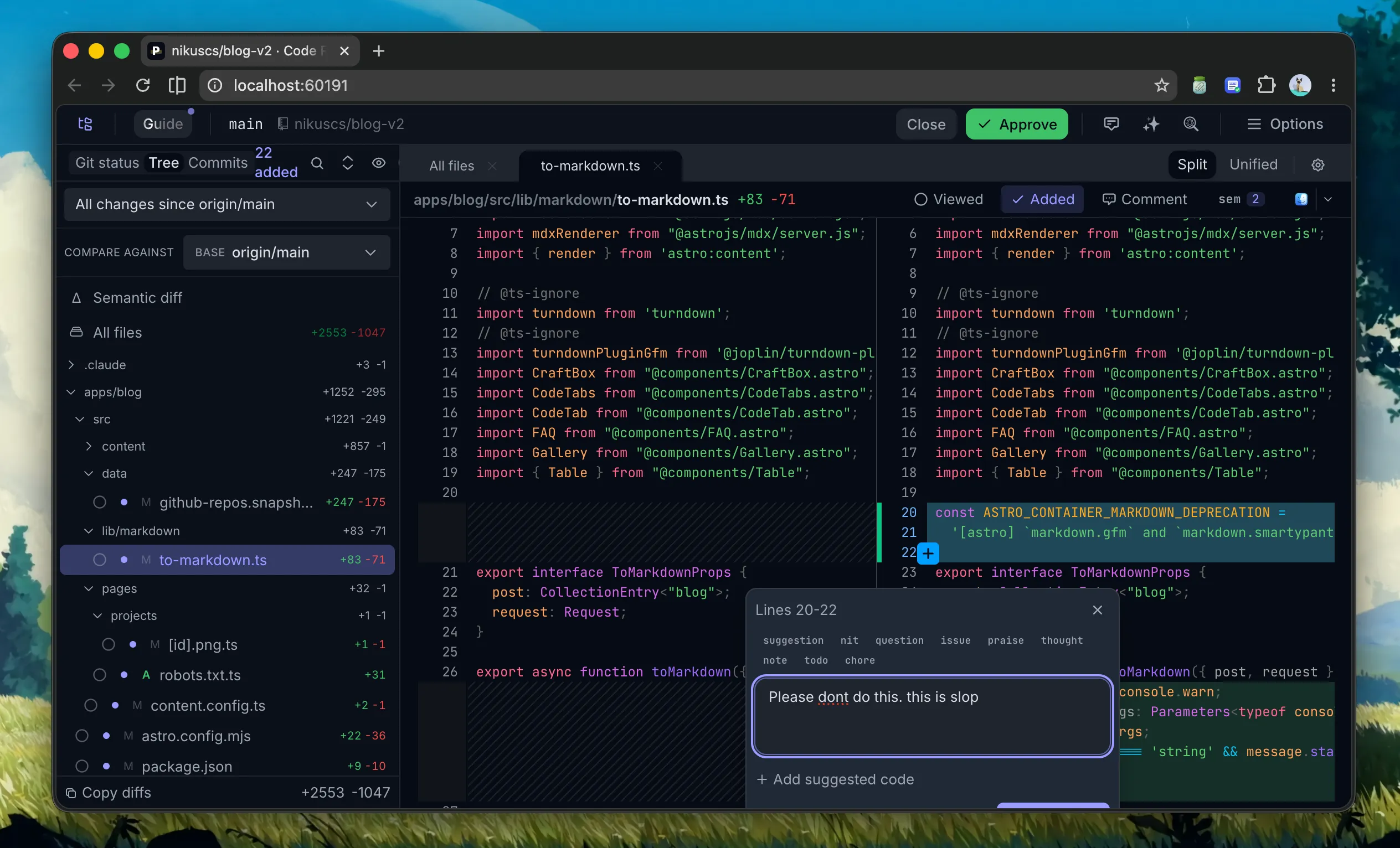
I do serious work most of the time, with some hobby and OSS stuff mixed in. I dont really vibe code unless its just for fun. So my rule is simple, treat the agents like real work. Its fine to run many, as long as you stay focused and actually read what they produce. The moment you stop reviewing, you are not orchestrating anymore, you are just generating slop faster.
More agents is not more productivity. More reviewed agents is. If you cant review it, you didn't really ship it.
8. The Mobile Question 📱
This one is interesting because the community is actually quite split on it.
I asked people what tools they use and where they want this to go, and a lot of the demand was for mobile. But a good chunk of the replies were the opposite, people who really dont like the idea of having agents on their phone.
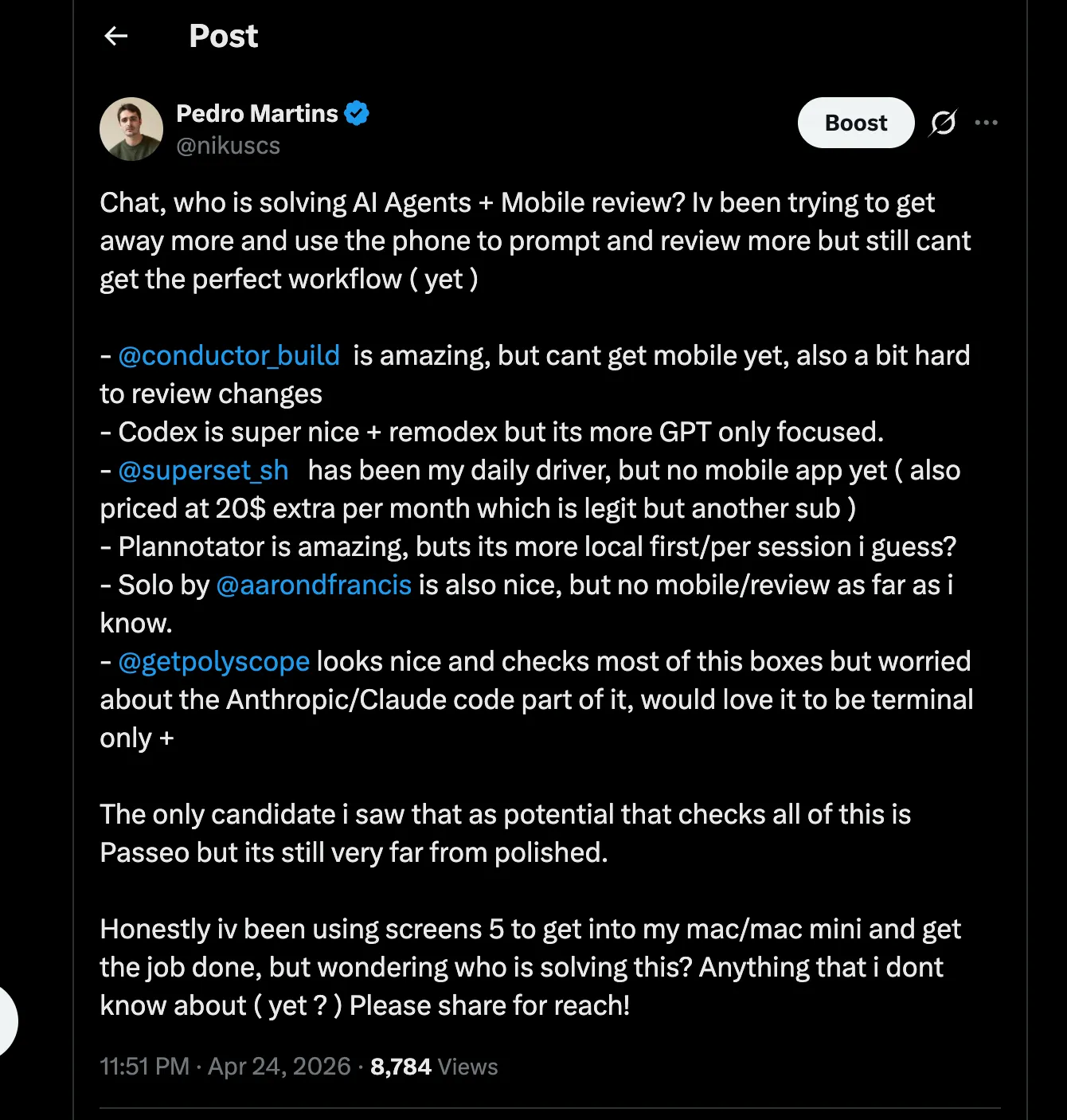
I asked the community what they're using and where they want this to go. Lots of demand for mobile, but also a vocal group against it. Worth reading the replies: the thread on X.
Their argument is fair too, work should be done at the desk. Agents in your pocket can just mean more work and less family time. If you can start a task from anywhere, you will, and suddenly there is no real moment to actually stop. Thats a real risk, im not gonna ignore it.
But i'm still ok with mobile, with a condition. There are real reasons to want it. You get a bright idea at the right moment, you can have an agent draft it before you forget. You are out somewhere but something urgent comes up, you can keep a bit of control. Thats actually really useful.
The key word for me is exception. Mobile orchestration should be the exception, not the default, or you just get addicted to it. Plan your work in advance and treat AI like your normal working hours. Use the phone for the idea you would lose otherwise, not as your default working setup.
9. Where This Is Heading 🔮
A few things i would love to see, and where i think this is going.
Funny thing, a lot of what i used to put on this list already shipped while i was using it. Mobile review and mobile preview were my two big wishes, and both are already here. Orca and Paseo both let you see the code and actually review it from your phone, so its not a "does it exist" problem anymore.
The gap now is the UI, not the feature. On both of them the mobile review flow isn't as nice as the desktop yet. What i really want is to select and annotate the same way i do on desktop, tap a few lines, leave a comment, batch it back to the agent. Thats the main thing still missing before mobile review feels as good as the desktop.
Seeing the result is already sorted on Orca. The browser passthrough gives you a real browser connected to your machine, so you can pull up the actual output from your phone, agent running on your PC or a VPS while you check it from wherever you are. Thats basically the "tiny window into your real machine" idea i kept wishing for. The bigger picture, the editor is slowly turning into an orchestrator. The single editor with a single agent setup is going away. The new normal is a bunch of worktrees and agents, with you sitting on top of all of it. Just dont forget you still have to actually review what they ship.
10. Wrap Up 🙏
So thats my 2026 workflow. Orca as the orchestrator, Claude Code, pi and OpenCode as the agents, worktrees keeping everything isolated, a little workspace.sh gluing it all together, and Plannotator for review.
If you are still on a single editor with a single agent, thats totally fine, it works. But if you are starting to juggle more than one project, give the orchestrators a try, they really make a difference once you start running things in parallel. Just go in with some discipline, cap yourself, and review everything.
The tools are great and getting better fast. The hard part was never the tools, its your own focus and review discipline. Stay focused, keep building, and dont let the agents run wild without you keeping an eye on them. Thanks for reading! 🙏
Bonus 🎁
If you want the full map instead of just my four, check out Agent MGMT, an independent directory of coding agent orchestrators and agentic IDEs, 34+ of them, sorted by platform, pricing, open source and GitHub stars. Its a handy way to see the whole landscape in one place. Credit to Manuel Meurer for building it and keeping it up to date.
Links
- Superset - Orchestrate parallel agents, desktop, CLI and MCP server
- Conductor - Mac app for running a team of coding agents
- Orca - Open source orchestrator, desktop and mobile
- Paseo - Self hosted, cross device agent orchestration
- Soloterm - Minimal terminal workspace for agents and dev processes, by Aaron Francis
- Plannotator - Visual plan and code review for coding agents
- pi - Minimal, extensible terminal coding agent
- OpenCode - Robust open source coding agent harness
- Claude Code - Anthropic's official coding agent
- Codex - OpenAI's coding agent
- Agent MGMT - Independent directory of coding agent orchestrators, by Manuel Meurer